
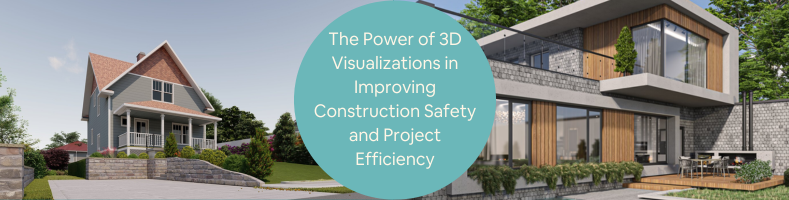
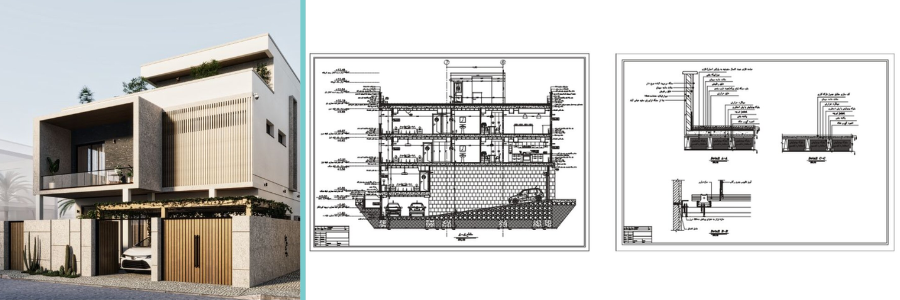
Not every architectural visualization firm is all about photorealistic rendering or design presentation. Sometimes, a visualization is meant to be nothing short of a detailed depiction of a project in progress, as in the case of BIM (Building Information Modeling). Unlike a typical 3D rendering, created primarily to impress potential buyers and stakeholders with lifelike, often dramatic CGI of a building’s interior and exterior, BIM takes a much more technical approach to visualization. Photorealism isn’t the main objective with BIM. Precision is.
A BIM model is supposed to be excessively detailed and accurate in every aspect of the project. It’s not heavily concerned with lighting and surface textures. BIM focuses on the more pressing project-related issues like structural strength, construction scheduling, prefabricated components, clash detection, utility systems installation, and that’s just to name a few. Basically, if something sounds complicated, BIM has the tools for it. In case you’re wondering why BIM sounds like a groundbreaking technology, that’s only because it actually is.
Among the most pressing issues in any architectural project are, of course, safety and efficiency. There is plenty that BIM can do to minimize, or at least reduce the risk of construction-related injuries and accidents while keeping the project running at an efficient pace. If you’re one of those people who think that health and safety protocols usually only slow things down, BIM might just change your mind and compel you to wear that high-visibility jacket. But the biggest impact of BIM in the AEC industry, in general, comes through improved efficiency. BIM affords the architect the power to oversee a construction project in its entirety via an interactive model. It enables them to practice almost godlike supervision, as in identifying and correcting mistakes before they happen.
Unfortunately, BIM adoption in the United States isn’t as fast or rigorous as in other countries, such as the UK, South Korea, Denmark, Singapore, China, Italy, France, Finland, and just about every other developed nation. The United States is a little bit (maybe more than a little bit) behind in BIM implementation, though things have improved over the last several years. Still, BIM professionals are relatively scarce in the country.
Among the few freelancing platforms focused on the AEC industry, Cad Crowd arguably has the largest population of archviz professionals. Many of these professionals specialize in BIM visualization services, with verifiable records and experience on projects big and small. Cad Crowd connects you with some of the world’s best-qualified talents to help you get the best of BIM technology through a managed collaboration to improve construction safety and project efficiency.
🚀 Table of contents
First, safety
According to OSHA, which apparently uses data from the BLS, the construction industry has consistently ranked worst in safety records among all sectors for more than a decade. In 2023 alone, there were 1,075 reported fatalities in construction, and nearly 40% of those happened from slips, trips, falls, and transportation incidents. It’s bleak data, which turns reading statistics from merely uninteresting into downright depressing. So what can BIM do to help with that? Apparently quite a lot.
Where there is a hazard, there is a risk of injury.
Among the main advantages of 3D visualization for construction projects is that it is, for lack of a better word, a time machine. But unlike the one invented by Doc Brown, this particular time machine doesn’t need an engineered flux capacitor to work, so this is much more practical. Even without an expensive, not to mention imaginary, plutonium-fueled reactor, 3D visualization can give you the power to sneak a peek into the future of a construction site.
So long as the visualization is built to match the proposed design within the BIM framework, it enables architects and engineers to have a walkthrough, as if they’re strolling the construction site in a virtual environment. The visualization moves across the computer screen, and thanks to BIM’s interactive nature, users can inspect the layout of every area of the model. Keep in mind that a BIM model isn’t the same as a photorealistic rendering. The walkthrough isn’t meant to see if the custom crown molding in the guest room has that special beige color or whether the garbage disposal in the kitchen is properly installed.
More often than not, the architectural design expert’s virtual walkthrough is intended to examine details that are otherwise hard to notice in the real world. Take, for example, a tight spot in the corner where a construction worker might get stuck while installing a fixture, or wouldn’t be able to operate power tools safely. In BIM, this issue is typically called a “soft clash,” which indicates an improper tolerance between objects that prevents a worker from fitting into a working area. When a construction worker cannot do their job comfortably and safely, there is a bigger risk of injury and accident.
3D visualization and virtual walkthrough allow the architect to identify such issues before construction begins, like a time machine. And since construction hasn’t happened yet, modifying the design won’t be expensive. The architect can widen the crawlspace or move some objects a little bit further from the wall to ensure proper tolerance. Identifying all the “leading edges” becomes easier. A leading edge is a place where a person must carry out construction work at a height, putting them at risk of a fall. By catching these risky spots in advance, the architect has time to install proper anchor points. While clamp anchors might work just fine in many cases, they often fail to put a smile on the OSHA inspector’s face.
RELATED: Architectural detailing services: Top 31 sites to hire freelance architects & drafters
Let’s not forget that BIM can support 4D modeling. In case you’re wondering, this 4D does actually refer to the fourth dimension, also known as time. This means connecting the three-dimensional (length, width, and height) visualization to scheduling simulation. The idea behind 4D is to track construction progress and prevent the project from straying too far from the expected completion timeline. Perhaps a day or two behind schedule is fine if you’re building a small shed for your gnomes, but it’s completely unacceptable in a doomsday bunker project. No one knows when the zombie apocalypse begins or the aliens’ invasion plan, so the bunker has to be ready exactly as scheduled.
4D BIM provides a clear, comprehensive view of how the construction site evolves over time as the project progresses. For instance, the construction site of an industrial warehouse appears largely empty during the first week of construction. As work continues, structural elements begin to appear alongside the heavy machinery and temporary facilities. Even the most demanding clients understand that a structure, especially a large one, doesn’t come together overnight and that a construction site often has specific paths for heavy-duty machines to enter and exit. But temporary facilities? They’re pretty tricky, even for architectural design firms.
Temporary facilities in a construction site may include office cabins, sanitation units, worker shelters, first-aid stations, warehouse tents, storage barns, batching plants, water tanks, parking areas, and lighting towers, to name a few. Pathways for vehicle movements might be regarded as such as well. One of the main problems with temporary facilities is that they’re rarely clearly marked on construction drawings, whether 2D site plans or 3D models. This makes good sense because the drawing is meant to represent how the finished project should look, not what it looks like while it’s a work in progress. No client wants (or needs) to see where the scaffolding and site fencing are in a blueprint. An architect is perhaps reluctant to provide such information because temporary facilities make the design look like a mess.
On the other hand, temporary facilities are essential. Imagine a construction site without porta-potties. Where do workers go when they really have to relieve themselves? Presumably, the neighbors’ toilets are affected because the batching plants are too close to the parking area. Bodily fluid contamination isn’t condoned, either. And if there’s no lighting tower every hundred feet, the early morning and night works are basically disasters waiting to happen. Although you’re not supposed to see any traces of those temporary facilities at the end of the project, installing and dismantling them should count for some of the highest-risk activities on a construction site. Fabrication yards and fuel storage tanks won’t just pop up out of nowhere, and they certainly don’t make themselves disappear when their time has come.
In high-rise construction projects, the scaffolding is just as complex as it is a fall hazard. And as you might expect, working at height makes all other hazards seem, well, even more hazardous, such as electricity, moving objects, material handling, equipment failures, and so forth. The hazards don’t particularly worsen at height (flying debris can hit you whether you’re a few stories high or on the ground). The lack of immediate help is the problem. For example, you can’t rush to the first-aid station from 30 feet on a scaffolding as quickly as when you’re at ground level. You can jump first and run immediately afterward, but that would be rushing it.
Still remember clients not wanting to see the scaffolding on a visualization? You really can’t argue with that. Scaffolding doesn’t belong in a design presentation. A good workaround is sub-BIM, which essentially is a subset of the actual (main) BIM model that allows you to focus on a specific trade of a project. Many rebar detailing companies have been using this kind of sub-BIM for quite some time to visualize how reinforcement bars are supposed to be installed before pouring concrete. The model even provides cost estimates for this specific phase. If there’s a subset of BIM for rebar, there’s definitely another subset for scaffolding. You use a subset not because it’s impossible to perform the safety and risk analysis on the main model, but because it allows you to separate the scaffolding visualization from the rest of the design.
Just about every safety analysis is based on simulations to determine the correlation between specific locations and the types of construction work performed in those areas. There are two reasons why clients aren’t interested in this: first, scaffolding isn’t exactly a pretty thing to look at, and second, they probably won’t notice whether the scaffolding provides enough clearance for a crane to move freely, or if some lighting towers are positioned too far away from the canteen. An architect, however, knows how to use sub-BIM as a tool to identify potential hazards, develop solutions to issues, and remind workers to always wear reflective clothing on the site. The data gathered from the simulation can help project managers make the site OSHA-compliant by implementing safety measures in areas where hazards are present.
A sub-BIM is good not only for scaffolding and lighting towers, but for every temporary facility you may need on a construction site. The 4D modeling (3D plus schedule) should give a better understanding of how and when non-permanent structures must be built to support the project. For example, you can simulate the construction and installation of fencing or barriers, modular offices, CCTV systems, prefabricated accommodation, generators, and security posts. It should also visualize or simulate how and when all those facilities are supposed to be dismantled and uninstalled as construction progresses.
A big part of 3D visualization services in BIM is engineered prevention (is there any other kind?) of safety risks. And if you can’t completely eliminate hazards, which is probably the case considering that you’re working on a construction site, at least the visualization helps identify where the dangers are. Although the model probably won’t show you how to fix the problems, it gives you time to develop a workaround that keeps the risk to a level acceptable to the OSHA inspector. Because you’re fixing the issues when the site is still a digital model, the project won’t blow the budget on safety problems. Ideally, only when all the dangerous parts of the project are smoothed over in a virtual world can the construction begin.
RELATED: 5 ways 3D architectural visualization can revolutionize your design process
Harder clashes identification
Every single clash is easy enough to fix when the construction site is a digital model rather than an actual structure made of high-strength steel and concrete. Sometimes, in the case of a soft clash as mentioned earlier, the fix is just to move objects a little farther apart, creating enough gap (or tolerance) between them to give a construction worker enough space to do their job safely. The solution to a soft clash isn’t usually expensive, but it can be, especially if you identify the problem after the fact.
And then there is a hard clash, which happens when two physical objects are (unintentionally) positioned to occupy the same space. For instance, an HVAC ductwork that bumps into the way of a structural beam or a water supply pipe that isn’t completely concealed by the wall in the corner. Fixing them should be easy enough for any construction worker (even a DIYer can do that), but only if they’re an isolated part of the structure. That said, it might still involve a sledgehammer and an electric saw, making the repair impractical indeed. Not to mention that it’s going to be extra work nobody likes.
Believe it or not, both soft and hard clashes can happen at the same time, including in temporary facilities. Case in point: a tower crane. Presumably one of the biggest, heaviest, tallest, and most exciting pieces of equipment in an architectural project and structural design services, a tower crane beautifies a construction site like nothing else. It’s a sight you can spot from miles away, instantly taking you to a simpler time when all you wanted was to become Bob the Builder. In an attempt to make this giant of accident-prone equipment seem friendly to younger minds, some people say that operating a crane is a lot like playing a twisted version of Tetris, where you stack a bunch of irregularly shaped blocks to build a structure. Unlike a Gameboy, however, a crane weighs fifty tons and must be kept away from kids.
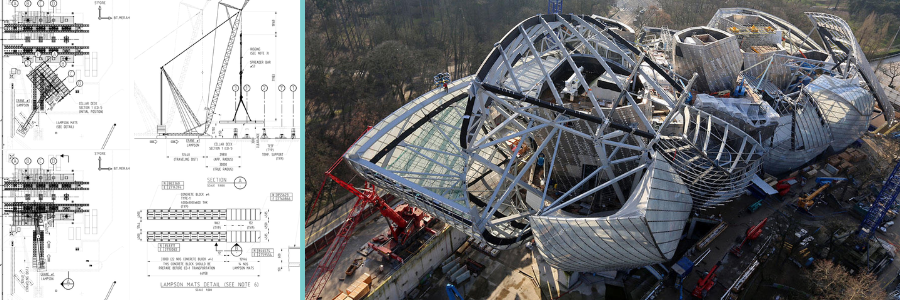
Tower cranes, along with everything they do in a construction site, are massive safety hazards on their own. Things get more dangerous when they’re operational, swinging the boom to lift excessive dead weight of steel and precast concrete into the air. Both the length of the boom and the swing radius make assembling a tower crane, which apparently often needs another crane, a high-risk undertaking. Once a tower crane is assembled, you don’t want to move it.
A 3D visualization helps you determine whether the tower crane is in the perfect position to perform all its heavy-duty boom maneuvers. If the construction site is in the middle of an urban area, there might be power lines and other high-rise buildings all around. A simulation should give you an idea whether the boom is too close for comfort. It also lets you identify blind lifts, or positions where operators can’t directly observe the load being lifted. Based on the simulation, you get to determine the ideal position (for the tower crane) and plan for spotters or cameras to compensate for blind lifts. By providing you with this level of planning, 3D visualization with BIM removes much of the guesswork from safety management, turning an otherwise hazardous work environment into, well, not completely harmless, but at least much less threatening.
Make the virtually invisible visible in the virtual world.
No, it’s not an opening line of a magic show, although it certainly can be a good one for that. It’s all about the power of reality-based digital simulation, the feature that makes BIM a true groundbreaking innovation in the AEC (Architecture, Engineering, and Construction) industry. If a typical architectural rendering shows you some flattering imagery of what a building should be, BIM simulations offer valuable insights into what’s happening under the superficial layer of a structure.
For example, a photorealistic rendering firm shows how the luxurious vinyl flooring in the kitchen shines, its surface reflecting the soft glow of the ceiling lamp. It appears smooth and tasteful beneath the wooden furniture and the polished stainless-steel doors of an unnecessarily large fridge. The imagery presented in the rendering is also what you’re supposed to see in the kitchen. BIM simulation takes a different approach. First of all, the visualization isn’t always pleasing to the eye because it mostly shows the room’s structural aspects, in this case, a kitchen. Second, and more importantly, the simulations tell you all that may happen during and after the construction is finished.
A BIM model can simulate many scenarios to determine how the structure withstands various external forces, including vibrations, temperature changes, exposure to loads, and water damage. During construction, the structural components of a building may suffer from variations that cause tiny, perhaps invisible, damage to the foundation, columns, beams, and walls. While hardly noticeable, even small damages can compromise the structural integrity from that point on, and put the entire project at risk of collapse. Of course, the example is an exaggeration, but not impossible, especially during risky phases such as the removal of temporary bracing or an enormous concrete pour. And sometimes, some things just choose to go wrong for no apparent reason, even when you try to be as accurate as you can.
With 3D visualization, it’s possible to simulate how a newly built structure reacts to external forces, such as vibration, which occurs frequently on a construction site. In the old days, you had to wait a few days or weeks until you realized that the floor, walls, or a precast concrete column had developed some cracks. The structural integrity was compromised, and the construction site became a major safety hazard. Perhaps a change in the concrete mixture, installing more bracing, a deeper socket foundation for the columns, or a pricier sacrifice to the god of thunder could prevent the issues, but you didn’t know that until it’s too late. 3D visualization with BIM, based on actual physics and real-world structural/material data, allows you to experiment with every single construction variable (in a virtual environment, of course). The otherwise invisible small cracks become visible, so you have enough time to predict and fix issues before they even have a chance to happen.
RELATED: Boost client confidence with 3D architectural animation for real estate presentations
Thorough planning, better efficiency
All the benefits you get from a BIM modeling expert in improving safety also apply to increasing project efficiency. Since there’s not much about how BIM enhances construction workflows that hasn’t already been covered across the web, we’ll keep it brief and straight to the bullet points.
- All-around clash detection: BIM can detect three types of clashes. Two of them (soft and hard) are mentioned earlier. Soft clash mainly concerns humans not fitting into a tight space, whereas hard clash happens when an object is positioned in the way of another. The third kind is a workflow clash caused by a scheduling conflict. For example, a concrete pour is scheduled before the necessary materials are delivered.
- 4D and 5D planning: the visualization is done in 3D, alright, but BIM has two additional dimensions to handle, namely time and money. The fourth dimension is all about the construction schedule, where the model is linked to the project timeline data. This is how you make sure the construction progresses as quickly as intended. And if there’s a delay or bottleneck during certain phases, the model adjusts itself accordingly to create a new timeline. Because BIM detects scheduling conflicts automatically, such as late material deliveries or delays due to severe weather, you can always refer to the model to devise a workaround. On the other hand, the 5D portion of BIM concerns money, specifically cost estimation. BIM is a data-rich model that adapts to every modification you make. For example, if you change the concrete floor thickness from 8cm to 10cm, BIM calculates the additional material you need and the additional cost to the total project cost.
- Progress tracking: The 4D system is great at telling you the difference between what’s supposed to happen and what actually happens on a construction site. At the heart of this monitoring system is a simple yet profound concept of comparing scan data of the as-built structure to the complete BIM model. You don’t need to do the scanning at the end of every workday, because progress will be too little in that interval, but weekly scanning should be more than enough for reliable progress tracking.
- Better prefab components: there may come a day when people no longer think that a construction site is a dirty, dangerous, chaotic work environment where things can go very wrong very often. But until that day arrives, off-site component fabrication, preferably in a clean, better-controlled factory environment, sounds like a good idea indeed. However, prefab components have to be precise to the tiniest detail to eliminate the need for cumbersome onsite adjustments. For instance, if a steel frame is supposed to weigh 2 tons but the factory delivers a heavier piece, the crane operator might demand a raise, and that’s pretty cumbersome. The good thing is that with 3D visualization services and BIM, accurate prefabrication is a much easier feat than it used to be.
And finally, we’ve come to the advantage that has become everybody’s favorite point to talk about, remote collaboration, for a very good reason. Project efficiency suffers greatly when every design decision must come from a lengthy process that brings all stakeholders into the same meeting room. And when they eventually get there after driving through a traffic jam or two on the way, somebody has to reiterate the design changes, why they were made, when they happened, and who proposed them. Then comes the reviewing session, which can take days, if not weeks, until everybody is clear on everything.
3D visualization with BIM eliminates these hassles because the model is stored in a centralized database, most likely in the cloud. Stakeholders, and basically everybody who’s anybody in the construction project, have access to the model at all times. Because data changes (progress, cost estimation, clash detection, you name it) are visualized in the models and updated in real time, remote collaboration is the logical next step. Thanks to 3D visualization, there’s little reason why decision-making can’t happen efficiently.
Takeaway
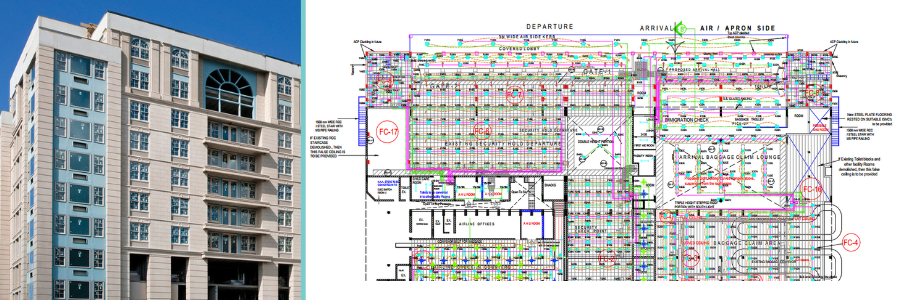
3D visualization with BIM is a data-rich, interactive digital environment. Think of it as turning the entire construction project into a “strictly” realistic video game with the kind of graphics that only architects can love. But unlike a video game where you can build and destroy buildings on a whim without as much as a second thought, all that you see in BIM must be based on a real-world construction site, down to the tiniest details, from the structural steel and concrete floor to temporary facilities and tower cranes’ load capacity.
Accurate digital twins of a construction project exist not to give you a fun time playing Bob the Builder, but to enable architects and engineers to gain a deeper insight into site safety and project efficiency. Emphasis is on the word “accurate” because even small mistakes in material specification, measurements, and geometry in the model almost always lead to costly delay and rework.
Once again, 3D BIM is not the same thing as architectural rendering. Although both offer project visualization, they’re separate trades handled by different specialists. Cad Crowd is one of the few AEC-focused freelancing platforms where you can discover and connect with experienced archviz professionals to help you build 3D BIM visualization with impeccable accuracy. All the freelancers on the platform have been pre-vetted to the highest standard, leaving only the best-qualified talents with proven records to provide their services to clients worldwide. Request a quote today.



