
In today’s post, we provide helpful information on how to cut prototype design costs for product design and engineering firms. Developing a new product can get expensive rapidly. And a big portion of the budget goes to the prototyping phase, which happens in an iterative fashion where you have to make a model, discover some flaws, improve them, and repeat the process over and over again until you manage to build the most refined, manufacturing-ready version. The cost of prototyping design firms probably accounts for at least a third of the entire product development budget.
Of course, there can be various factors that affect how much money goes into the prototyping phase, but in general, the more complex the product is and the more expensive the materials are, the higher the budget should be. For example, if you discover a lot of design flaws in a prototype, you need to do a lot of refinements and make it better the next time, and this process costs time and a good amount of money.
Another problem is that there’s no guarantee the new prototype won’t have any issues either, so you have to give it another go and repeat. Prototyping stands as one of the most crucial phases in product development services. It’s not like you can cut corners and cheap out on every model. At least not when you want the product to work well and look good, as intended. The good thing is, there are many things you can do to reduce the cost and make the phase as efficient as possible while still maintaining accuracy and overall quality.
Let’s not forget that there’s always Cad Crowd, a freelancing platform mostly frequented by thousands of New Product Development (NPD) professionals based in the US, the UK, Canada, and Europe. Whether you’re looking for engineers, designers, fabricators, contract manufacturers, or project managers to reinforce your team, Cad Crowd connects you with qualified specialists through flexible hiring options.
RELATED: Designing Prototypes: 3D Design Services for Inventors and Companies
Efficient prototyping
We’ve mentioned earlier that prototyping is crucial and likely expensive, but it turns out there might be a few good measures to help you run it in a much more efficient manner and hopefully reduce the cost to hire product designers.
Build your own prototype, if you can
This might’ve been a hot take in the old days, but it shouldn’t be the case anymore now that 3D printers are getting more affordable. What if you want to prototype using metal materials? Yes, you can now 3D-print metals, too. Some entry-level metal 3D printers cost around $10,000 – $20,000 these days, which isn’t exactly a bargain, but not ridiculously expensive either. Also, the idea of prototyping is to build early versions of a product’s design. You’ll be doing it in an iterative fashion until you’re satisfied with the model.
Once the design is finalized, you can always partner with a third-party fabricator to make a high-fidelity “production version” prototype to send to a contract manufacturer as a sample. Because the outsourcing part doesn’t happen until the final build, you can save a lot of money by creating every other model in-house. Metal parts like aluminum, stainless steel, titanium, or alloys can be quite a hindrance. However, it only applies to designs that require you to build prototypes from those materials. For products that are mostly or entirely made of plastic, in-house rapid prototyping with 3D printers is a no-brainer.
There are plenty of small desktop 3D printers from reputable brands available for under $1000. But just to be safe and have more options, budget anywhere between $1500 and $2000 to get a larger and more capable 3D printer. But not every company, especially startups and small design firms, can afford to purchase a complete package of 3D printing equipment. When the budget is tight and you don’t have the funds to invest in the right tools, outsourced prototyping still makes good sense.
RELATED: What Are The Main Prototypes Used By Companies in Industrial Design Prototyping?
The right methods for the right job
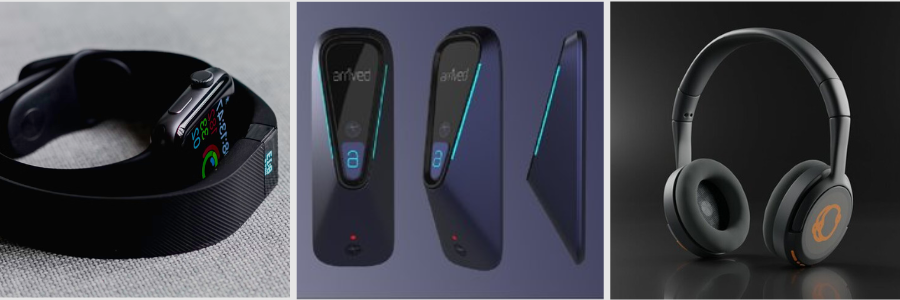
Now, whether you outsource prototyping or do it in-house, it’s important to determine exactly what you need from the model. The prototype design expert may have to build multiple models throughout the prototyping phase, and each model serves a different purpose. The earliest version is the most basic form of the product, with some rough edges and almost no functionality. A follow-up model is slightly more refined with better aesthetics and a little bit more useful. You keep going with the gradual improvement, sometimes by focusing on one aspect at a time.
For example, a basic concept only needs to show that the idea is technically feasible. It might be crude, but so long as it delivers a solution to a problem, you can say that the model serves its purpose well. Finishes and details are not the biggest concerns at this point. In many cases, building a PoC (Proof of Concept) needs no fancy tools. You can make it using cardboard, plywood, or maybe LEGO bricks. For the electronic parts (if the product is an electronic device at all), development kits such as Arduino, Raspberry Pi, and ESP32 are the usual options. A concept isn’t simple because it shouldn’t be. You make do with off-the-shelf materials.
The time will come when you have to blend good aesthetics and functionality into a single model. Before you get to that point, however, separate the “looks-like” prototypes from the “works-like” ones.
- “Looks-like” prototype focuses on the aesthetics, or the outer shell of a product. With electronics device design services, for instance, the outer shell is the hardware enclosure, the sides that people see.
- “Works-like” model cares only about the functional parts, such as the inner mechanisms, the electronic components, or both. This allows the engineers to rig all the features and functionalities correctly without having to worry too much about aesthetics. Of course, there are still concerns like dimension and user interface (button placement, screen, battery compartment, etc.) because the components have to fit inside the outer shell eventually anyway.
RELATED: Complete Guide to Prototyping Methods Used in Product Development Services for Companies and Firms
As you progress from PoC and move closer toward the more refined models, 3D printing companies are your true saviors for efficient prototyping. That being said, not all 3D printers are created equal. For instance, FDM (fused deposition modeling) printers come with affordability and simplicity for anyone looking to get started with additive manufacturing. The big trade-off is part quality.
Say you want to build a prototype for the visual presentation. Part surfaces must be smooth with good details without sacrificing structural integrity. While you can use an FDM method for it, SLA (Stereolithography) printing is the better choice thanks to its tighter tolerance and higher accuracy. Parts made using SLS (Selective Laser Sintering) services and a 3D printer might not look as refined, yet they have excellent mechanical characteristics.
Despite being separate streams in the early prototyping phase, start merging the “looks-like” and “works-like” as soon as possible. You don’t want to keep them in siloed development environments any longer than necessary. Better still, avoid siloed development and use a cross-functional team to handle the entire project instead. This way, the designers responsible for the aesthetics and the engineers working on the inner mechanisms can do their jobs in a more collaborative fashion. Integration at a later stage is risky. If the internal and external parts don’t fit, it’s best to discover the issue sooner rather than later.
Digital twin and simulations
Without a doubt, the biggest money-saving factor of them all is the digital twin, particularly the simulation part. A product development project is riddled with errors. You build a prototype, hoping everything will be perfect, only to discover so many flaws in the model. While it’s practically impossible to build the ideal and flawless production version model on the first try, you can at least minimize the chance of mistakes using a digital twin. It’s a hard pill to swallow, but physical prototyping has always been a major hurdle in a product development cycle.
RELATED: Prototyping Techniques Utilized for Complex Products at New Product Design Companies
The complex fabrication, lengthy testing, and the nature of a hit-and-miss approach to engineering day in and day out can get tiresome quickly. Thanks to CAD (computer-aided design) firms and virtual prototyping, thankfully, most of those issues are completely avoidable. Digital twins and simulation become the new standards in just about every NPD project out there. CAD has come a long way since its first day in the 1960s, if not earlier. In 2026, you’re spoiled with advanced tools to build both the traditional 2D imagery and a photorealistic 3D visualization of any object.
You can think of it as creating a blueprint of a product, but instead of drawing it as a static diagram on paper, CAD generates an interactive digital twin. It doesn’t completely eliminate the need for physical prototyping, because you still need a physical model for testing and evaluation, but virtual prototyping saves you a lot of headaches and prevents wasteful use of resources. The term “virtual prototyping” is pretty much self-explanatory. 3D CAD designers have all the tools you need to build a prototype as a digital visualization on a computer screen. The product exists first as a virtual object, so no matter what you do to the object, it only happens on a computer screen.
You can remove parts, add more components, change the shape, or modify it in any way without having a physical prototype made. And more than just an image, popular CAD software like Autodesk Inventor, SOLIDWORKS, and PTC Creo are loaded with options that allow you to test the virtual prototype with simulations. Even the open-source FreeCAD has robust simulation capabilities as well.
Among the most common (and useful) tools include FEA (Finite Element Analysis) services to simulate vibration, thermal response, and structural test; CFD (Computational Fluid Dynamics) for airflow analysis, fluid behavior, and thermal distribution; Mechanism Dynamics to analyze motion, interaction, and interference between components; and Behavioral Modeling that evaluates how a design reacts to an external factor like changes in temperature or pressure, to name a few. In general, virtual prototyping and simulation open the door to a detailed analysis of how a design, product, or system behaves under different use case scenarios.
RELATED: 10 Tips on How To Find the Best Prototype Engineering Firm Services
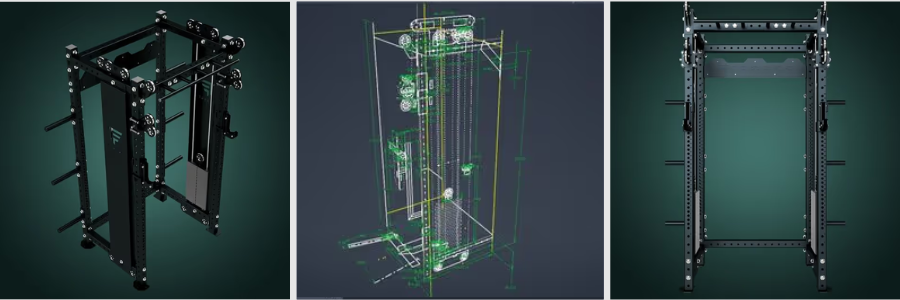
Software like Altium and KiCad can do PCB simulation with such features as signal integrity analysis, error debugging, electromagnetic interference checking, and more. The only requirement is that your model, in this case the digital twin, has to be identical to the actual product. It can be rather problematic because you’ve only been building the prototype as a digital file, so there’s nothing physical to compare the model to. You don’t have clear points of reference, but that’s exactly what virtual prototyping is all about. Advanced 3D CAD software comes equipped with tools and options to help you build a virtual object, including a product design, from scratch.
You can experiment with various materials, form factors, colors, dimensions, PCB layout design, and every single specification imaginable. All without having a physical model in hand. It’s basically a CGI (computer-generated imagery) done under the constraints of actual physics. Being able to produce a prototype in a complete virtual environment is a major relief, both technically and financially. Since you don’t have to go through a lengthy process of trial-and-error with multiple physical models and consume a whole lot of development resources on them, the entire prototyping phase runs more efficiently at very low cost, objectively much lower than the alternative.
For example, running a simulation to see the thermal distribution of a product takes several hours. You have the data ready by the end of the simulation, as it is generated almost in an instant by the computer. The more powerful the computer, the faster it goes. The same analysis done on a physical model can take days to complete. On Day 1, you use the product extensively or expose it to a high temperature to see how it reacts to heat. You also need to know at what point the product begins to fail. On Day 2, you revisit everything to analyze the failure and compile evaluation reports. On Day 3, you may want to try to reproduce the first test just to see whether there’s any inaccuracy.
And at the end of the process, the tested models are damaged beyond repair, costing you hundreds of dollars, if not more. While simulation has a big impact on cutting down the prototyping cost, it’s not the only thing that matters in new product design services. Another major advantage of digital twins is improved collaboration. Because everybody works on a single model stored in the cloud, a cross-functional team can see all the changes made to the virtual prototype in real-time. Designers and engineers use the same model to make better, more educated, and informed decisions each time, based on the latest available data.
RELATED: Adaptive and Iterative Prototyping: Iterate on Your Product Design With Industrial Design Firms
Practical tips for physical prototyping
Digital twins and simulations are great and all, but they will never completely replace physical prototyping. You still need physical models to evaluate the product’s actual real-world performance in the hands of testers. For instance, the simulation might show that the product can withstand a drop from 10ft onto a pavement or submersion in water up to 15ft deep. Sometimes, you just have to see it happening in the real world to be 100% convinced.
Does this make the simulation less useful? No, because CAD and digital twins mainly function as a guide to help you build a product that’s at least as good as what the virtual model demonstrates. You put what you see on the screen to life, and hope that the result of the product delivers the expected performance, reliability, and durability. Only with physical prototype design engineering experts can you get a taste of that coveted hand-feel experience. Is it comfortable to hold, enjoyable to use, and practical to store? No amount of simulation can answer those questions. When the time comes to build a physical prototype, mind the following:
- Be prepared to iterate. Just because you’ve done all the simulations, it doesn’t mean the next physical model is going to be exactly what it’s intended to be. Most of the time, the product still needs further refinement. Products that look good on screen aren’t always that good in real life.
- Only build what you need. Have a clear plan for what you want to do with the prototype once it’s built. If the prototype is meant to be a “Beta” version, perhaps you don’t have to use the most expensive materials and the highest level of detail. Remember that CAD modeling, simulations, and physical prototyping don’t all have to happen in one go. They’re all part of an iterative process.
- Use additive manufacturing. As mentioned earlier, 3D printing (and CNC machining, actually) are still the most affordable methods to build prototypes. You’re not making hundreds or thousands of units at this point. The cost per unit is more expensive compared to injection molding, but for a very low production volume, additive manufacturing is the way to go.
Also, build one prototype at a time. Do not build another prototype unless you’ve fully tested the current one. You need all the data from the tests to make sure that the next iteration addresses all the issues.
RELATED: How to Make a Prototype for Your New Product Design
Closing thoughts
Additive manufacturing has been around for quite a while now, so there is no reason for design firms not to take advantage of it now in 2026. Some would say that 3D printing is basically an extension of CAD because the printable model must be created first on a computer. Together with virtual prototyping and simulations, they’re often regarded as the best things to have ever happened to product development at large.
How Cad Crowd can help
Having said that, all those great technologies are simply tools. And no matter how sophisticated the tools are, they make little to no difference to your NPD project if you put them in the wrong hands. You need professionals to create the printable model, build a 3D digital twin, and run the simulations so that you gain nothing but accurate, relevant, and usable data from the process. Cad Crowd is home to experienced CAD technicians, 3D printing specialists, and fabricators to help you build prototypes efficiently. Get a quote today!



