
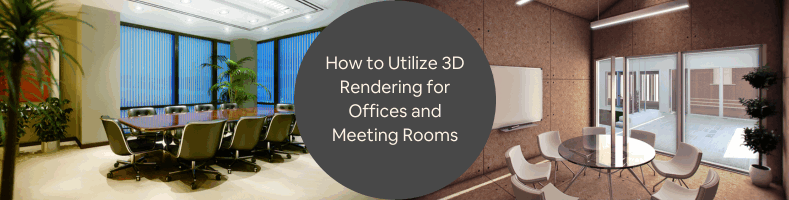
If your company is renovating its office or building a new conference room, you’ve likely encountered one challenge in particular: How do you know what the completed space will actually look and feel like before the walls go up, the furniture rolls in, and the lighting fixtures buzz to life? Blueprints assist. Mood boards assist. Even a stroll through the vacant space assists. But all of that pales in comparison to the clarity—and assurance—you receive from a top-notch 3D render.
That is where 3D rendering services companies from Cad Crowd, an accredited industry leader, come in and revolutionize the game.
Whether you’re a technology startup establishing your initial HQ or an international company restructuring your collaborative spaces, using a visualization company can radically enhance both the result and the process of your office design. And if you’re particularly interested in designing more effective meeting rooms—those all-important areas where ideas are conceived and deals are cut—then 3D rendering isn’t merely beneficial; it is crucial.
Let’s take a look at how this technology brings office space to life before a single physical change is executed, and how to collaborate with the correct visualization team to turn your ideal workspace into a digital (and ultimately, physical) reality.
🚀 Table of contents
- Why meeting room and office design matters more than you think
- What exactly is 3D rendering for office spaces?
- Common office and meeting room challenges solved by 3D rendering
- Types of 3D rendering visuals for offices
- The real business value: It’s not just about aesthetics
- Working with a visualization services firm: How to get started
- Step 3: Work out the concept
- Step 4: Review and approve
- Tips for making your renderings really shine
- What makes a good visualization firm?
- You don’t need to imagine it—You can see it
Why meeting room and office design matters more than you think
The greatest office designs today are no longer about cramming desks into rows or tossing beanbags into corners for a startup feel. Rather, they’re about intentional design decisions that mirror your business’s culture, amplify productivity, and accommodate a hybrid team. Nowhere is that more apparent than in conference rooms.
These spaces are no longer stale fluorescent caves with misaligned chairs and dubious speakerphones. They are now ergonomic, acoustically balanced, technologically integrated, and visually appealing spaces—purposeful spaces crafted by interior design experts.
That purposefulness doesn’t come by chance. It comes about through visualization.
RELATED: How to determine the quality of architectural 3D renderings with design services companies firms
What exactly is 3D rendering for office spaces?
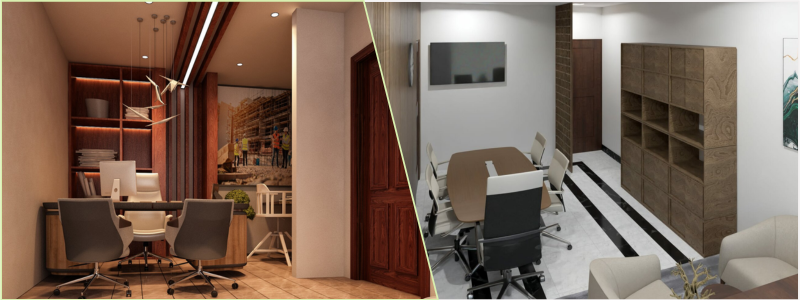
3D rendering is the method of making realistic, digital versions of physical environments before they are constructed or remodeled. By means of advanced software, 3D software artists can produce photorealistic images (and even animation) depicting how a room will appear from various perspectives—with precise furniture, lighting, wall finishes, artwork, and even people using the space.
In office design, these renderings aren’t mere decorative images. They are decision-making tools.
They enable stakeholders to:
- Assess the furniture layout and spacing.
- Try out various lighting schemes.
- Imagine branding elements on walls or glass dividers.
- Catch potential design issues early.
- Make quicker, more assured decisions.
Common office and meeting room challenges solved by 3D rendering
Suppose you need to transform a 20-foot glass-walled room into a two-in-one boardroom and brainstorming area. You might draw it out, create a PowerPoint, or explain your vision to the team, and likely end up with ten variations.
With 3D rendering, everyone views the same space, the same colors, the same furniture arrangement—and most importantly, the same atmosphere.
Here are some typical challenges 3D rendering resolves:
- Will the space feel too crowded or too sparse? A 2D floor plan service can report it “fits,” but only a 3D render will illustrate how the arrangement actually feels.
- Is the technology placement logical? Ceiling mics, wall-mounted displays, and speaker systems tend to be afterthoughts—until you observe how clumsily they stick out of a wall in a render.
- Is the lighting functional as well as welcoming? You can try out anything from pendant lighting to daylight exposure in a render, preventing you from the notorious over-lit office “surgery room” look.
- How does branding appear in the space? 3D rendering can bring to life how your company logo, mission statement, or even brand colors appear in context, not only on a mockup.
Types of 3D rendering visuals for offices
Visualization companies usually provide a combination of tools and deliverables. Here’s a cheat sheet to the kinds of visuals you may be working with:
- Static 3D renderings: These are high-res, still photos that depict the proposed space from particular perspectives. Imagine magazine-quality images of a space that doesn’t yet exist.
- 360-degree panoramas: These interactive renders allow observers to virtually walk through the room by click-and-dragging—ideal for providing execs or distant teams with a “walkthrough” feeling.
- Animation flythroughs: Want to wow a boardroom or present to a large tenant? A video flythrough mimics a stroll through the space, providing an experience of flow, layout, and atmosphere.
- Virtual reality (VR) integration: Some firms even offer VR-ready versions of your render. Strap on a headset and experience the space in immersive 3D before a single drywall panel is installed.
The real business value: It’s not just about aesthetics
Yes, your rendered office will look sharp and on-brand. However, the real ROI comes from avoiding costly mistakes and streamlining collaboration for architectural design firms.
When you work with a visualization services firm, you’re investing in:
- Improved vendor communication: Let your contractor know precisely what to construct.
- Alignment of teams: No more “I thought we agreed on.” arguments.
- Buy-in from stakeholders: Executives and investors will be more likely to approve a project they can visualize, not just dream about.
- Design precision: Verify proportions, materials, lighting, and sightlines.
Working with a visualization services firm: How to get started
So you’re ready to bring your dream meeting or office space to life—before one chair is ever rearranged or a single wall painted. That’s where 3D rendering services enter the picture. Whether you’re designing a high-tech boardroom, an innovative brainstorming nook, or a warm client lounge, collaborating with a professional visualization company brings your workspace design to (virtual) life.
But where do you start? Here’s a step-by-step guide to assist you in starting off on the right foot.
RELATED: Exploring 5 key elements of hotel lobby 3D design and CAD interior detailing services
Step 1: Define your vision and goals
Before you even contact a 3D architectural visualization service, clarify what you’re attempting to create. This doesn’t necessarily mean you need to know every detail, but you should have a good sense of the function and mood of the space.
Ask yourself:
- Who will occupy this space? (Executives, hybrid teams, visiting clients?)
- What technology must be incorporated? (Consider screens, conferencing tools, power hubs.)
- Will the design have to allow for flexibility for remote or hybrid work?
No matter if you’re imagining an open-think-room concept or a soundproof solo pod, the more precisely you can articulate your objectives, the more your 3D partner can accurately envision it.
Step 2: Collect your materials
After you’ve defined the vision, it’s time to gather up the resources that will bring it to life. Most 3D rendering companies will request:
- Existing floor plans or blueprints of the space
- Existing photos, even if they’re just a snap on your phone
- Any particular furniture or decor you intend to utilize
- Branding assets such as logos, color schemes, and design guidelines
- Reference or mood images (Pinterest boards and Instagram saves are totally fair game!)
Keep in mind, this process is all about making an idea into something visible—so the more references you share, the easier it is for the rendering team to get it right.
Step 3: Work out the concept
Excellent architectural planning and design companies don’t work by instruction alone—they work in partnership. Be prepared for an artistic collaboration involving give-and-take negotiations. There are likely to be several rounds of sketches and re-drafting, and that is perfectly fine.
Here’s a pro tip: be precise in your feedback. General comments such as “make it cooler” or “more fun” won’t help. Rather, try “We’d love for the wall color to be identical to our main brand color” or “Can the lighting be more natural, akin to morning light?” This type of direction enables the designers to fine-tune precisely what you need.

RELATED: How 3D visualization is transforming property sales for developers & real estate services companies
Step 4: Review and approve
Once drafts start rolling in, take the time to review everything thoroughly. This is your opportunity to make final adjustments on:
- Furniture layout or spacing
- Lighting temperature and placement
- Surface materials like wood grains or fabrics
- Placement of branded elements like signage or logo walls
When you’re happy with how it all looks, you’ll get your polished, high-resolution renderings—perfect for internal presentations, marketing decks, or even passing on to contractors or interior design firms.
With a little planning and open communication, using a visualization services company can be an inspiring and efficient means of brainstorming your next great workspace concept—before moving a single piece of furniture.
Tips for making your renderings really shine
- Don’t overcrowd the scene: Conference rooms need to look spacious and welcoming, not congested with an excess of chairs, plants, or accent pieces.
- Consider human presence: Some renders have people interacting in the space—this can aid viewers in comprehending scale and function.
- Natural light makes a difference: Even in an indoor room, mimicking daylight or gentle artificial lighting adds your render a warm, inviting feel.
- Reveal tech integration discreetly: No one will want to see a clunky projector or messy cords. Render your tech as smooth, integrated, and contemporary.
- Align style with company culture: Does your brand have a bold and innovative personality? Or is it professional and calm? Reflect that in the space.
What makes a good visualization firm?
Not all rendering services are alike. Look for firms that:
- Specializing in interior commercial drafting and design services or workplace visualization.
- Deliver photorealistic quality, not cartoon images.
- Offer multiple views and revisions.
- Know how to show materials, acoustics, and ergonomics.
- Explain clearly and adhere to timelines.
RELATED: How to hire freelance CAD design talent for your project: Tips for design companies and firms
You don’t need to imagine it—You can see it
Office space and meeting room design should never be a guessing game. With the support of a 3D visualization company, you go from “What if?” to “There it is!”—well before you’ve ordered your first piece of furniture.
Whether you’re designing a think tank, a private client conference suite, or a hybrid-ready team room, 3D rendering lets you envision it, believe it, and create it.
Go ahead—make your meeting spaces smarter, your offices more intuitive, and your design process much simpler. You have the technology to make it all happen. Contact Cad Crowd today for your free quote.



