

Artificial Intelligence has become the easiest tool anyone can pull nowadays, helping in various ways we wish to efficiently create. And it’s no different when it comes to new product design services as it significantly changes its workflow dynamics. Through the integration of AI-assisted tools, engineers and architects can generate, render and produce realistic visualizations faster.
In this article, we highlight how these AI-Driven capabilities reshape the process of product development. And how despite its technical power, human expertise remains essential. Platforms like Cad Crowd proves it by connecting businesses with experts worldwide who can successfully turn AI-assisted concepts into real and practical products.
| Design Stage | AI Application | Main Benefit |
| Ideation | Text-to-image and sketch-to-render tools | Faster concept exploration |
| Visualization | rendering and model-to-render workflows | Quicker realistic product visuals |
| 3D Generation | Text-to-3D modeling tools | Rapid early-stage prototyping |
| Engineering CAD | Generative design and optimization | Improved design efficiency |
| Simulation & DFM | AI-assisted analysis | Detects issues early |
Where does AI fit into the modern product design workflow
Stage 1. IDEATION
1.1 How is AI changing the ideation stage of product design?
This is the starting point of developing a product design, where product concept designers explore and create possible concepts before creating models or prototypes. In this stage, they consider different features, forms, and solutions to determine the right direction for a specific product. Traditionally, it’s made from real hand sketches, lengthy brainstorming sessions, and repetitive manual revisions. And it can really take time, especially when there are a lot of ideas that are needed to compare.
Through artificial intelligence, this process has become easier for the designers as the process becomes more efficient. By the help of different tools like text-to-image and sketch-to-render, designers can transform ideas into a visual representation more quickly. Technologies like these help in testing different styles, communicating various concepts, and improving designs before finally proceeding into CAD development. Instead of replacing creativity, AI helps 3D designers by expanding its pool of ideas wherein they can freely explore and refine.
RELATED: The Impact of AI on 3D Architectural Rendering Services for Companies and Firms
1.2 How do text-to-image and sketch-to-render tools support designers?
AI helps designers in moving smoothly from early ideas to visual concepts faster by the help of these two major approaches:
- Text-to-image – It helps in creating product concept images out of written descriptions or prompts. Designers can freely explore different forms, styles, and designs without the need to provide a detailed sketch. This helps in speeding the concept generation and exploration of various creative features. It is also helpful for teams to visualize ideas and concepts early in the process of design development.
- Sketch-to-render – It transforms actual sketches into a real product rendering. Platforms like Vizmo help designers to easily experiment with the different materials and finishes, refine concepts, and improve their visual presentation without exerting too much effort. This makes everything easier, especially in communicating ideas before proceeding into the creation of CAD models.
1.3 What are the common AI ideation tools for product design?
- Vizcom – It is an AI sketch-to-render tool that mainly transforms rough hand sketches into realistic product visuals. It is very helpful, especially for product designers who want to have a quick result and have several materials, forms, colors, and styles to explore while keeping its original design concept.
- MidJourney – It is a text-to-image AI tool which helps designers in generating early visual concepts out of written prompts or references. It can also be used for exploration of different product shapes, aesthetics, styles, and creative directions during brainstorming of ideas.
- DALL-E – It is an image generational tool which helps in creating concept visuals out of text descriptions. It helps designers to visualize early ideas before starting to develop more detailed and accurate models.
- Adobe Firefly – A generative AI tool which supports concept exploration through creating and editing images out from text prompts, which allow designers to test several visual approaches.
- Stable Diffusion – It is an AI Image generation model which creates concept images out of prompts and references, helping designers to have a flexible option in exploring several product directions.

Stage 2. VISUALIZATION
2.1 How is AI rendering speeding up product visualization?
After selecting a specific concept, 3D visualization designers will then create a realistic visual to evaluate and present it before finally building its physical prototypes. Product renderings help in communicating the intention of the design and identify what needs to be improved early. It also makes things easier for stakeholders and clients to properly understand the proposed design. Through this, confusion and uncertainty will be reduced before the production begins.
In the traditional way, it highly requires extensive manual work when creating a photorealistic rendering. Designers need to prepare models, adjust lighting, apply materials, and refine camera settings just to achieve the desired realistic results. Yes, it produces high-quality visuals, but still, it can really be time-consuming. That’s why design revisions really take longer during the early stages of product development.
RELATED: Pros & Cons of AI for 3D Modeling Services and Your Cost Savings at Companies in 2026
2.2 How does AI improve the rendering process?
AI improves rendering through multiple key functions:
- Faster photorealistic rendering – It helps in transforming 3D models into realistic visuals without the need to exert too much effort.
- Automated design adjustments – It provides suggestions of different materials, lighting, and environments that are suitable for the design to have a better visualization.
- Multiple design variations – It allows product development designers to freely explore various colors, styles, and finishes quickly.
- Reduced production time – Through its quick and fast rendering, teams can gather feedback and refine possible changes early on.
AI-assisted rendering greatly helps designers in creating realistic product visuals efficiently in a way that it reduces the amount of required manual setup. It converts 3D models into photorealistic renders, provides materials and lighting suggestions, and generates various visual variations. With the help of these AI-driven capabilities, designers can compare different styles, finishes, and colors more efficiently. It also reduces the rendering time used in the process, giving teams lengthy extra time to review and improve its concepts quickly.
By making visualization efficient and easier, AI allows teams to communicate ideas early on and arrive with final decisions confidently. Once the appearance of the specific concept has been refined, the workflow will successfully progress to developing its digital models, wherein AI-assisted 3D generation provides another layer of speed and creative experimentation.
Stage 3. 3D GENERATION
3.1 Can AI-generated 3D models be used for product development?
Once the concepts are visualized, CAD designers will then create digital 3D models that define the product’s structure, dimensions, and shape. In the traditional way, the process highly requires building models manually using CAD software, which needs technical skills and keen attention to details. Creating accurate models really takes time, especially when there are a lot of design directions that need to be tested.
AI is changing 3D modeling in a way that incorporates text-to-3D and image-to-3D tools that easily generates digital models from visual or description references. With the help of these tools, designers can explore three-dimensional forms and test concepts before proceeding into detailed CAD development. Platforms like Tripo and Meshy really helps in speeding up early modeling and support faster design experimentation all throughout the process of development.
RELATED: Will AI Replace 3D Artists in 2026? Expert Insights for ArchViz & Architects
3.2 How are text-to-3D tools supporting early design exploration?
By the help of AI-generated 3D models, 3D modeling designers can explore product concepts quickly by creating early digital forms out of simple concepts or references. These tools provide teams with designs in three dimensions before they proceed to develop detailed CAD models. They also make it easier to try different design shapes and directions during the early stages of the process.
AI-generated 3D models help designers to:
- Create concept models quickly. Designers can create simple 3D forms without the need to build everything from scratch.
- Explore multiple product variations. AI allows teams to try different sizes, shapes, and design options. Visualize ideas in 3D. Designers can easily understand concepts before they proceed into professional CAD workflows.
- Support presentations and discussions. Early models are easier to present to clients and design teams.
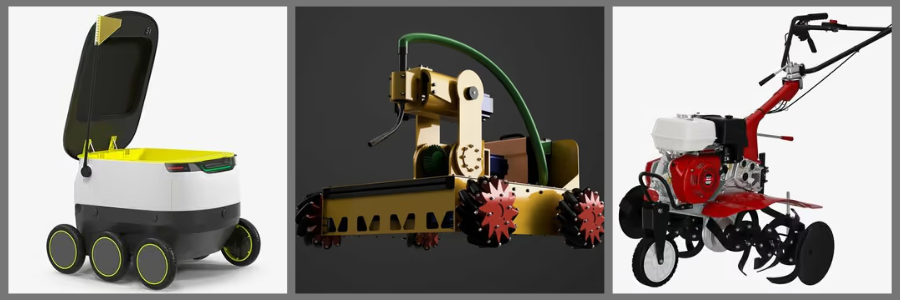
Like, for example, a designer who’s developing a consumer product can use AI-generated models in evaluating proportions, shape, and the entire appearance before finally creating a detailed engineering model. In this way, the 3D models designer can save time and improve decision-making right from the early stages of the product development.
3.3 What are the leading AI text-to-3D tools for product design?
- Meshy – It is an AI-powered text-to-3D and image-to-3D platform which helps users in generating 3D models out of written descriptions or references. It is useful, especially for users that want to have a quick result and to explore different visual concepts, product forms and styles.
- Tripo AI – It is a text-to-3D and image-to-3D tool which helps in converting descriptions or images into detailed 3D assets. It helps designers to create partial models faster and experiment with several forms during the stage of concept development.
- Luma AI (Genie) – It is an AI 3D generation tool that specifically creates 3D objects out of text prompts. It helps users to freely explore different ideas and deliver digital assets specifically for visualization.
- Kaedim – It is an AI-assisted 3D modeling platform which converts 2D images into accurate 3D models. It helps speed up the transition from visual ideas to 3D dimensional forms.
RELATED: How AI Trends Influence New Product Design and Development Companies
Stage 4. ENGINEERING CAD
4.1 How is generative CAD transforming engineering design?
When concepts and initial 3D forms are finally developed, the product will then proceed to the engineering stage, where its designs will be refined for functionality, performance, and manufacturing. It highlights the important factors like structure, materials, and production requirements. Ensuring its accuracy is very important since it highly affects how a product will perform in real-world application.
AI significantly helps in improving engineering CAD as it helps design engineering teams to develop and optimize designs more efficiently. With the help of tools like topology optimization and generative design, engineers can freely explore various solutions based on constraints and specific requirements. Instead of recreating variation manually, with AI, the options are optimized, which leads to faster and better-informed decision-making.
4.2 How does generative design support engineers?
Generative CAD tools help engineers to:
- Generate several design options – AI creates several possible solutions according to requirements like materials, strength, and weight.
- Optimize structures – AI helps in identifying areas where they can reduce materials while also maintaining its quality performance.
- Explore solutions faster – Engineers can freely compare various approaches more efficiently while in the process of development.
- Improve CAD workflows -AI helps in ensuring repetitive modeling and documentation tasks.
Through generative design, engineers can create and evaluate optimized solutions according to its specific performance requirements. AI-powered CAD tools generate several design options while also considering its factors like strength, weight, and material limitations. This lessens the manual trial and error work and speeds up the engineering process.
For example, an engineer designing a specific bicycle component can use generative design in exploring several geometries, which would help to balance both material and durability efficiency. Instead of manually testing every option, AI provides optimized feature designs which are helpful to engineers as they review and refine each project.
RELATED: Generative AI Design Technology for 3D CAD: A Comprehensive Guide for Companies
Stage 5. SIMULATION AND DFM
5.1 How is AI improving simulation and design for manufacturing checks?
Before finally starting the production, engineers must make sure that the product is reliable, functional, and suitable for manufacturing. In this process, simulations, design reviews, and manufacturing assessments are important to detect any possible issues. Identifying problems early helps in reducing costly changes and can save both time and energy. Through AI, simulation and design for manufacturing (DFM) services improve in a way that it helps teams to analyze designs faster and identify potential challenges way earlier. With the help of these tools, areas that need improvement are being detected before prototypes are created. Through this, engineers and designers can create better decisions while modifications are way easier and affordable.
AI uses simulation tools help engineers to:
- Analyze design performance through identifying potential issues or weaknesses early.
- Predict possible failures before creating physical models for testing.
- Optimize designs according to its specific performance requirements.
- Reduce the number of physical prototypes needed during the process of development.
5.2 How does AI enable faster design iteration and validation?
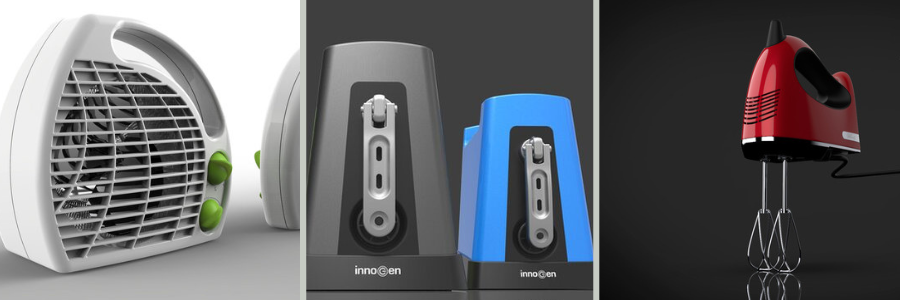
AI helps engineers and designers in improving the product development process by providing tools that make testing and revisions faster. Rather than just relying on the physical prototypes, teams can already use AI-assisted tools in evaluating designs, identifying issues, and making judgments way earlier. Through this, several design options are open for exploration in less time. AI helps lessen the time needed for iteration and validation through performance analysis, simulation, and automated feedback. It allows teams to refine designs right before production to reduce errors and save resources. By improving the speed of testing and decision-making, AI allows products to achieve development milestones efficiently and productively.
RELATED: How AI Innovations Transform Modern Consumer Product Design at Agencies & Companies
5.3 How much time can AI save in product design workflows?
The productivity impact of AI highly depends on the kind of tools, workflow, and complexity of the project being created. According to some companies and AI solution providers, 40-to-70%-time reductions in these specific design workflows, specifically in repetitive tasks like 3D visualization, concept exploration, and certain engineering processes during the development. This percentage should be taken as reported improvements instead of guaranteed results, as real outcomes really vary on human expertise, implementation, and project requirements.
Just because it is capable of efficiently creating things, it does not mean that AI eliminates the need for thorough engineering review. Manufacturing recommendations and simulation results still require experienced professionals who can validate and interpret specific findings, considering the real-world constraints, and making final decisions about the product’s performance and feasibility. The integration of AI into simulation and DFA checks helps product teams in moving faster, while also maintaining the level of accountability and precision they follow in the process of producing successful manufacturing.
What can AI not do in product design?
It is undeniably true that AI has rapidly evolved and transformed many parts of the product design process. But it does not equate to the fact that it is the sole reason to create a successful product. Though it is powerful enough to generate concepts, optimize designs, and identify issues, it does not completely understand the actual realities behind engineering and manufacturing decisions. Successful products need more than their visual design. Engineers and 3D product designers must ensure product’s safety, cost, production limitations, material behavior, and user needs since these are the areas that are very essential to professional judgment.
| Area | AI Capability | Why Human Expertise Is Still Needed |
| Materials | Helps in exploring design options | Engineers are the ones who evaluate performance, cost, and suitability |
| Safety | Assists during product analysis and testing | Experts responsibly ensure standard compliance and real-world safety |
| Tolerances | Supports drawings and specifications | Engineers determine functional precision requirements |
| Manufacturability | Identifies possible design issues | Professionals decide if production is realistic |
Products that are run through AI-generated designs can really look impressive, but visual appearance alone doesn’t guarantee that it is successfully made. Its concept must still be thoroughly validated through manufacturing experts, engineering knowledge, and the understanding of how it would perform in the actual world. In this day where artificial intelligence emerged into every aspect of design, we can really say that the strongest product development stems from the combination of AI’s ability to smartly process information and generate uniqueness with the creativity and realistic judgment of the hands of experienced professionals.
RELATED: Artificial Intelligence & AI’s Impact on 3D Rendering Design at 3D Modeling Companies
Yes, AI efficiently helps in the journey from concept to design, but human experts are the one responsible in ensuring that the final product is safe enough to operate, function, and ready for production. AI transforms and evolves the process of product development. But it’s with the hands of the expert 3D product rendering professionals that makes the work successfully done. And great results come from putting together the strengths of both worlds. Here in Cad Crowd, we ensure to provide you with the right experienced professionals who combine modern design tools with the expertise needed in delivering high-quality results.
FREQUENTLY ASKED QUESTIONS
What is AI product design?
AI product design mainly refers to the application of artificial intelligence tools in the process of creating product development like visualization, ideation, CAD optimization, 3D modeling, and design validation. It helps designers and engineers to explore more ideas and concepts, automate repetitive tasks, and improve design decisions.
What are the benefits of using AI in product development?
Some of the few benefits of AI in the process of product development are the following: helps product teams to develop ideas faster since it reduces the time spent on repeating design tasks; allows more exploration of several creative concepts; assists in generating design variations, optimizing CAD models, creating realistic renders, and in identifying potential issues early; improves efficiency and speed; and allow designers and engineers to specifically focus more on its creative problem-solving, refinement, and technical decisions for real-world applications.
What is generative CAD and how does it work?
Generative CAD mainly uses AI algorithms in design solutions for strength, materials, weight, and performance goals. That’s why instead of creating every single design variation, 3D engineering designers can instantly provide constraints and objectives, and the system will produce multiple potential solutions automatically. After that, the designs are refined, reviewed, and validated by engineers, ensuring that they are safe, practical, and suitable for manufacturing.
RELATED: The Future of Electronic Design Engineering: Innovations and Trends for CAD Services Companies
Are AI-generated 3D models ready for manufacturing?
Usually not since it still needs final touch of refinement as it may possibly lack accurate dimensions and production-ready geometry. This is to ensure they properly meet all the manufacturing requirements.
How Cad Crowd can assist
AI transforms product design by providing tools that make the work faster and efficient like concept exploration, generative CAD, rendering, and design iteration. However, in the process of creating successful products, it doesn’t just rely on AI alone as it also depends on the expertise of engineers and 2D & 3D designers who smartly apply real-world judgment in manufacturing, materials, and specific performance requirements.
In fact, the successful future of product development is not about AI replacing experienced professionals, but rather experienced professionals incorporating AI as they create better solutions in the days ahead. If you want your concepts or ideas successfully brought to life, explore Cad Crowd and connect with the right experts who deliver high-quality AI-assisted, manufacturable design solutions. Contact us for a free quote.



