
In 2026, AI has shifted how 3D rendering services and visualization are done. What was once long and weeks’ worth tasks can be completed in hours or days. The quality of the renders and visualization has improved, making it even more realistic. The access to advancements made high-quality 3D visuals become more affordable for all kinds of businesses. Cad Crowd is a reliable platform that connects businesses to skilled freelancers who specialize in AI-powered visualization. This gives companies the capability to deliver tasks faster with improved quality
Key AI rendering impact stats at a glance
| Metric | Result | Context |
|---|---|---|
| AI denoising render time reduction | 50–80% faster | V-Ray, Arnold, DLSS benchmarks |
| AI upscaling compute savings (1080p → 4K) | ~75% less compute | vs. native 4K rendering |
| Virtual staging cost reduction vs. physical | 60–80% lower cost | Real estate visualization |
| Automated product variant rendering | Days vs. weeks | E-commerce catalog production |
| Real-time ray tracing feedback loop | Seconds vs. hours | vs. offline render pipeline |
| Reduction in late-stage revision cost | Significant | Real-time client walkthroughs |
| AI post-production sky replacement | Seconds vs. 30 min | vs. manual masking |
| Animation delivery time reduction | Up to 60% faster | AI automation + denoising |
| Architectural rendering cost reduction | 30–40% typical | AI-enabled freelancers vs. studio rates |
| Per-image cost at scale (product variants) | Dramatically lower | Programmatic material swapping |
Why visualization costs are under pressure in 2026
The economics of managing internal teams for 3D visualizations in 2026 has shifted. Aside from the rising labor costs, software subscriptions are way more expensive than ever. Clients nowadays also expect faster delivery of high-quality results. These pressures are driving businesses to turn to AI-assisted tools and outsource solutions instead.
1. High labor costs in the United States
The true cost for a single architectural visualization project does not just rely on labor costs alone. It also includes overhead costs like employee benefits, workspace expenses, hardware and software fees and subscriptions. In the United States, a senior 3D visualization artist can earn from $70,000 and $110,000 per year, which is already expensive enough for a simple project. AI rendering tools do not replace skilled and professional artists. It acts as a support by handling the administrative and repetitive tasks, allowing designers to focus on more valuable and critical scopes. AI reduces and compresses the design timeline significantly, minimizing project costs without compromising the quality.
RELATED: Pros & Cons of AI for 3D Modeling Services and Your Cost Savings at Companies in 2026
2. Software license inflation
To deliver high-quality renders, professional software such as V-Ray, Arnold, and Chaos Cloud is used. These programs are expensive and paid yearly for every user. Not only that, but there’s also still the need to acquire GPU rendering farms, asset library subscriptions and any other packs. All these become a fixed overhead cost, which may be hard to bear for small businesses. This is why instead of fully committing to an in-house visualization department, businesses are outsourcing services. This allows them to just pay for the outcome or deliverables, no need to think of the software to be used. Platforms like Cad Crowd allows businesses to have access with high-quality projects, without long-term financial commitment.
3. Compressed client timelines
Now that advancements are accessible, clients expect shorter deadlines with higher quality. This could be a struggle for businesses who are not used to modern tools and software, they experience greater pressure in processing and completing the work. This could lead to employee burnout as they try to juggle multiple works in a tight timeframe. The challenge can be resolved through AI. It has streamlined workflows to assist in the design stage. Through real time ray tracing, AI denoising and automated setups, designers would not feel much burdened with tight deadlines. They can work on other tasks that need further attention. In 2026, speed is not an advantage anymore. It is required to survive in the market.
4. The cost of late-stage revisions
In traditional workflows, late-stage revisions are expensive. When there’s a need to change in output during the late stage, even a small change of color would require more time and effort. The requests may appear little and simple during discussions but would be tedious for designers since it may require reopening complex scenes. The effort and time needed to make a simple request could be impractical and incur unnecessarily high costs. AI-powered real-time visualization tools confront these issues by making the review process more interactive and efficient. With these, there’s no need to wait for the full render to complete to receive feedback and comments. Clients can see changes before final render. This way, there would be minimal late revisions, creating a smoother workflow.
Three categories of AI cost reduction
Category 1: direct cost savings
AI rendering tools directly reduce production costs by compressing setup hours and labor work required to complete the deliverables.
5. AI Denoising: faster renders at lower cost
AI denoising left a great impact on modern rendering cost reduction. Conventionally, 3D product rendering designers would need extensive high counts to remove visual noise and deliver photorealistic outputs. Doing this would take hours, especially if the model is detailed. Through AI denoising, it is possible to efficiently clean up renders faster. There are programs that have built-in denoising such as NVIDIA’s DLSS, Intel Open Image Denoise. These tools remarkably changed how rendering studios operate. The rendering process time will be reduced even with low sample counts, without the quality being compromised.
RELATED: The Impact of AI on 3D Architectural Rendering Services for Companies and Firms
6. Real-time Ray tracing
One of the major breakthroughs in visualization is real-time ray tracing. These technologies are powered by NVIDIA RTX graphics cards. This allows the designers to produce a more accurate lighting and shadows digitally. Previously, realistic lighting would require large render farms running overnight. They can only see the outcome the next morning. The long waiting time delays the project. Real-time ray tracing allows an interactive design process. This helps in viewing the renders in real time so the 3D designers can explore more and adjust when needed. They don’t have to wait for a day to check and review if the output is enough to meet their standards. This helps spot flaws early, saving time and money.
7. Text-to-image and AI scene generation
AI image generation tools like Midjourney, Stable Diffusion, and Adobe Firefly already shifted to early design. It allows the designers to have flexibility in generating visual concepts just by text prompts. Designers wouldn’t have to set up and build the whole drawings, the visual can be done in a matter of minutes. This is useful for early-design stages wherein the concepts are needed to be presented to clients or investors. AI generation would take less time than manual set-up and allow multiple outcomes. This is a practical approach to minimize the risk of investing time into wrong concepts.

8. Automated material and texture application
One of the most time-consuming processes in 3D visualization services is applying textures to every material or part of the model. It requires full attention and accuracy to manually edit so it won’t look off and awkward. The material textures selected and applied should fit and complement each other. AI-assisted tools can help in automating this process by predicting and suggesting textures that matches the materials, AI can analyze a scene and suggest fitted materials for it. This is especially useful for interior design projects that have lots of textures to apply. Instead of investing time in tweaking and selecting material textures manually, designers can focus on decision-making and improve overall productivity.
9. AI-powered lighting setup
Balancing light to make it appear natural requires a lot of time to adjust it. It needs to be carefully tweaked to control exposure and avoid harsh shadows and brightness. Doing this manually requires time and effort just to capture a picture-perfect scene. AI lighting tools can simplify this by automating realistic light applicable to the scene. This way, the designers wouldn’t have to start from scratch. They can just edit and tweak the generated light to make it appear more natural and realistic.
10. Cloud rendering cost optimization
AI-driven cloud rendering platforms optimize job distribution efficiently. It can automatically analyze a scene and predict render time needed for it depending on its complexity. It makes smarter decisions on how it will be processed and allocates GPU resources dynamically. It also can detect possible issues with the scene, preventing render failures. AI-powered cloud rendering systems help 3D rendering designers to predict and get a more cost-efficient outcome. It optimizes the visuals, produces favorable results and prevents further failed attempts. It minimizes render time, which lessens project costs.
RELATED: Will AI Replace 3D Artists in 2026? Expert Insights for ArchViz & Architects
AI rendering tools: what they do and where they save
| Tool / Technology | Primary Function | Cost/Time Saving |
|---|---|---|
| NVIDIA DLSS / AI denoising | Noise removal at low sample counts | 50–80% render time reduction |
| RTX real-time ray tracing | Interactive photorealistic preview | Eliminates overnight render farm runs |
| AI upscaling (DLSS / FSR) | 1080p → 4K output | ~75% compute cost reduction |
| Text-to-image (Midjourney / Firefly) | Concept visualization from prompts | Hours → minutes at concept stage |
| AI material assignment | Auto-apply PBR materials by context | Half-day → hours for scene setup |
| AI lighting setup | Generate plausible light rigs automatically | Several hours saved per scene |
| Cloud render AI job management | Optimize GPU allocation, prevent failures | Reduces wasted compute spend |
| AI sky / HDRI generation | Dynamic environment from text description | Eliminates HDRI library dependency |
| AI post-production (sky, entourage) | Automate compositing tasks | Minutes vs. 30+ min per image |
| AI scene analysis / QC | Pre-render error detection | Prevents failed render farm jobs |
Speed: the hidden cost lever in visualization
Speed is directly linked with cost and timeline of the project. The faster the turnaround time is, the greater the savings are. It is the most underappreciated factor in the visualization work. AI changes this by automation, speeding up and streamlining workflows.
11. Render times cut by up to 80%
A noticeable improvement in modern rendering is how AI can reduce render times up to 80%. This is driven by AI denoising and upscaling technologies. Traditionally, clean and noise-free images would require as high as 2000 sample counts to make it look polished. With AI, the same level of quality can be achieved with as little as 400 samples. This is a dramatic reduction in time and directly impacts the profitability margins. This allows more iterations to be done without increasing the rates. It makes the visualization process faster and cheaper.
RELATED: How AI Trends Influence New Product Design and Development Companies
12. From overnight renders to same-day delivery
It is common for renderings to be done overnight since it used to be a slow process. It often causes delay especially when the rendering artist finds issues after the render, making the design process start over again, with all the tedious time and effort just to complete a single project. The once 8-12 hours of rendering can now be compressed to less than 2 hours of waiting time. This improvement is driven by AI optimization. It makes it possible to produce high-quality visuals faster than before. It makes the project more responsive to feedback and comments without delay.

13. Faster iteration cycles
What makes AI rendering remarkable is the capability to process faster iteration cycles. It improves the overall back and forth process of design and review between designers and clients. Once feedback is received, the once 8 hours of work can be compressed into 2 hours. This allows more iterations to be done within the project. Faster iterations impact cost, making the project save money from costly mistakes that may be caught during late stages. It allows the project to have better alignment to the design intent without delay and increasing costs.
14. Real-time client walkthroughs
One of the most remarkable changes in modern visualization is real-time client walkthroughs. The visuals are not limited anymore to 2D or animations. Through game engine platforms like Unreal Engine 5 and Unity, it is possible to enter a fully interactive environment where clients can freely move in the space. This gives them a unique experience and helps in easily identifying issues or concerns. It allows the clients to understand the model space more clearly, letting them raise issues early even before committing to construction. This has minimized reworks significantly and improved approval timelines.
15. Automated animation and flythrough generation
The conventional way of creating animated flythroughs of a product would be an intensive work that could take a full day. It requires manually setting camera keyframes, tweaking right camera movements to make it appear more natural. Not only that, but the final render would also take an overnight process to complete. This makes the delivery just for the animation quite longer. AI-assisted 3D animation services and tools address this problem by compressing timelines and quickly generating a base animation. This way, the designers wouldn’t have to build from scratch and just refine the base model. When combined with AI denoising, the production and delivery time can be reduced by 60%.
RELATED: How AI Innovations Transform Modern Consumer Product Design at Agencies & Companies
16. AI upscaling for high-resolution output
AI upscaling is a strategic approach in producing high-quality visualizations in a more efficient manner. Tools like NVIDIA DLSS, AMD FSR, and dedicated image upscalers let artists render visuals in a low base resolution like 1080p, then upscale it to 4k or 8k. The goal is to minimize GPU processing but still produce high-quality results. There could be a slight difference between this and rendering at high resolution but it’s often minimal and not visible to the human eye. This approach makes the rendering process faster and saves costs.
17. Parallel variant rendering
AI-powered render farm management allows new product designers to have access to multiple design variations at the same time. Traditional workflows are limited to producing one render at a time which takes longer and wouldn’t have the flexibility to produce another one simultaneously. This is why rendering traditionally costs more time and labor, and less exploration of ideas. To maximize product visualization, several design visualizations can be produced. With this, the clients would have a wider range of options to choose from. It makes their decision process more efficient.
18. Rapid prototyping of visual concepts
AI image generation tools allow a broader exploration of ideas during the early design stage. Instead of investing more time in researching and building just one design concept, it allows rapid prototyping designers to have access to multiple style preferences in less time. The quick visuals could be rough but helpful enough to set project direction. A fast delivery of visuals smooths communication with clients. It gives them an opportunity to give their feedback, so misunderstandings can be avoided. Rapid concept visualization makes a project more focused and efficient, minimizing possible reworks on site.
Visualization speed: before vs. after AI
| Task | Conventional Timeline | AI-Assisted Timeline | Improvement |
|---|---|---|---|
| Hero architectural still (1 image) | 8–12 hours render | 1–2 hours render | Up to 80% faster |
| 100-image product variant catalog | Weeks | Days | 60–70% faster |
| 60-second architectural flythrough | 2–3 days (animate + render) | < 1 day | ~60% faster |
| 4K output from scene | Native 4K: full compute cost | 1080p + AI upscale | ~75% compute saved |
| Client feedback loop | Next-day re-render | Same-session real-time | Days → minutes |
| Concept visualization for brief | 1–2 days (3D setup + render) | Hours (AI generation) | ~80% faster |
| Scene lighting setup | Half day to full day | 1–2 hours with AI assist | 50–70% faster |
Quality: Where AI visualization pays for itself
In 2026, AI can create cheaper deliverables, without sacrificing quality. It helped achieve efficiency and higher quality standards, making it a more reliable solution.
RELATED: Generative AI Design Technology for 3D CAD: A Comprehensive Guide for Companies
19. Photorealism at lower cost
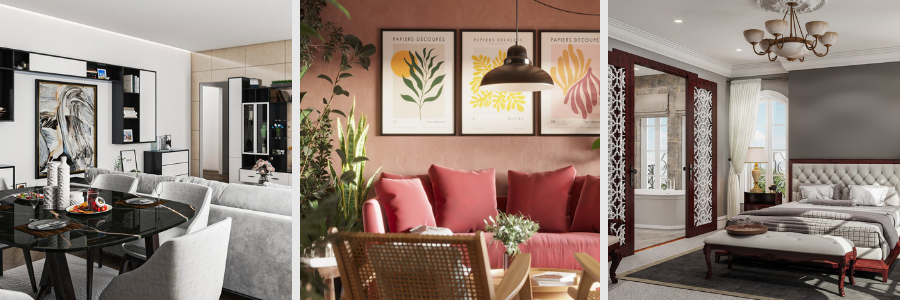
In the past, access to realistic visualizations was limited. It would require high-level expertise in physical-based photorealistic rendering. A careful simulating and tuning of lighting are needed as well as precise material calibration. The whole technical process of setting it up is a privilege only well-funded studious can consistently pull off. Now with AI, it is possible to gain access to modern tools to handle automation of lighting and shading to achieve photorealistic effect. This allows designers to not start from a blank canvas. This shift is significant because all businesses would have access to a high-end visuals at lower costs.
20. Consistent lighting across large projects
Manually editing lighting for large-scale projects could mean massive labor hours and costs. One of the greatest struggles is maintaining consistency all throughout the project. When done manually, there’s a tendency of inaccuracy and small differences and may create issues later. AI-assisted tools help maintain consistency by locking in a visual style and apply it across the whole model or visualization. This makes it look more cohesive and polished. This helps in delivering outputs that signifies professionalism.
21. AI-Assisted post-production
Post-production is not as easy as it sounds. It is a major part of finishing the work through color grading, sky replacement and tweaking any other atmospheric effects.AI can now automate these tasks and reduce time in completing it. For instance, in 3D architectural visualization services replacing the skies manually can take approximately 30 minutes, but AI can do it in seconds. The basic corrections can be done way faster, making the process more efficient. It removes the need to do all tasks manually so designers can focus more on refining it.
22. Accurate material representation
One useful advancement is AI-powered material libraries and scanning tools. Instead of relying on manually edited textures, it is now possible to make use of scanned materials through photogrammetry. This way, a more realistic and accurate material texture is captured and applied to the model. When the materials are accurately applied, it closes the gap between reality and visualization. This allows designers to communicate their design better. The visuals would be a reliable reference of the model.
23. Intelligent camera composition
AI-powered camera composition eases the visualization process by suggesting camera positions, focal lengths and framings. It is trained to quickly identify which angles would be best suited and make the model look balanced. AI tools can help the 3D modeling designer flag poor compositions before rendering, reducing the risk of reworks and iterations. It’s a more efficient approach than blindly testing camera angles only to revise it after rendering. AI can help the designers optimize the overall visual quality, producing better images in less time.
RELATED: Artificial Intelligence & AI’s Impact on 3D Rendering Design at 3D Modeling Companies
24. Error detection before render
AI scene analysis tools help in scanning and catching issues in 3D projects before rendering. It can identify and flag issues that may cause a render to fail such as missing geometry, incorrect scaling, lighting issues or mismatched textures. Traditionally, most of the errors are only found after rendering, which makes it costly to fix. AI reduces wasted effort by not having to go back and forth rendering and fixing multiple times. It catches issues that can cause problems before processing, allowing designers to fix it right away instead of re-rendering all over again.
25. Automated quality checking
AI-powered quality checking assists 3D CAD rendering designers to maintain consistency in applying standards in their rendering projects. It automatically analyses and flags deviations and compares finished renders with predefined standards. Through this, it is faster to check inconsistent gradings, missing elements, or any unrealistic texture directions in the model. Automated checking reduces the amount of time a designer has to invest in manually reviewing the model. It lessens the risks of human oversight and improves the overall quality of the visualization. This gives more time for the designers to focus more on refinement.
26. Sharper detail with AI super-resolution
AI Super-Resolution helps in recovering rendered images and make them appear more detailed and sharper. This can be done without manually editing and adjusting rendering settings. It can automatically enhance the surface details such as fabric textures, wood grain and any other detailed textures. AI analyzes visuals and provides a more efficient way to enhance its clarity. It lessens the need of utilizing GPU power just to provide high resolution visuals. Its impact is to deliver more convincing and realistic visuals while keeping the rendering time and production costs at minimum.
27. Dynamic sky and environment generation
Traditionally, scenes are edited through a series of trial and error. AI tools can automatically generate photorealistic elements, background and environment settings that match the design mood or style. The goal is to reduce efforts in manually editing elements in the scene just to get the desired style. It minimizes depending on purchased HDRI libraries and time spent looking for the right sky or environment. 3D architectural rendering designers gain more time and businesses can cut costs. It’s a win-win situation, without compromising quality.
Generative design and product visualization
In 2026, AI has reshaped the role of visualization in the design process. With AI’s involvement in the industry, clients are expecting faster deliverables, in its highest quality. This means that visualization would need to catch up with the growing opportunities AI continues to introduce.
RELATED: What is Generative Design and Why it’s Important for Your Company
28. Generative design requires better visualization
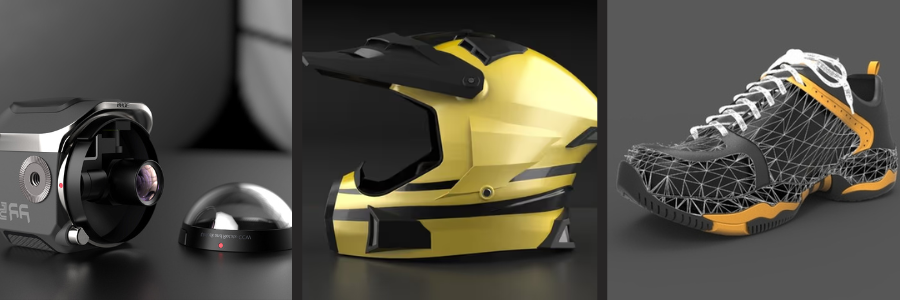
Generative design produces outputs that are sometimes too complex to produce in conventional CAD models. To adapt to this complexity, 3D modeling designers utilize AI rendering tools such as path-tracing to handle the challenging geometries and high-detailed patterns. As more industries utilize and adopt AI in their design development, the demand for advanced AI rendering tools also increases with it. This is why businesses are aligned to investing in AI-assisted services and tools so they can keep up with the growing trend.
29. Product visualization at scale
Consumer goods companies often work with large numbers of product visuals for online stores, advertising and catalogs. This means multiple visual variations of a certain product need to be created. It could take a lot of time and work if done manually. AI automation can help product rendering designers in streamlining the whole process by producing hundreds of varying visuals from a single master scene. It can swap colors and materials through conditions or rules. This is a more efficient approach instead of doing full renders every variation.
30. Architectural visualization for complex projects
Large architectural projects such as airports, hospitals, and mixed-use developments may require a tedious amount of visualization work. It could be hard to work on, managing quality and consistency all throughout. This project may even take weeks and months to finish, depending on how detailed and complex the model is. AI generation and scene management tools allow designers to handle this more efficiently by using Automated LOD management. This AI-assisted tool helps in speeding up organization and application of materials in large environments. It helps in ensuring consistency and removing repetitive tasks. This eliminates the struggle of finishing a large-scale project in tight deadlines.
Practical adoption paths
Not all businesses can commit to AI utilization. Here are some practical entry points worth exploring:
31. Start with AI denoising
One way to start without fully changing the entire workflow is using AI denoising. It is a practical tool that is integrated directly into existing render programs such as in V-Ray, Arnold, and Redshift. It helps in refining visualizations without the need to disrupt the current design process. It reduces render time while improving the overall design quality.
RELATED: Trends Shaping the Future of Product Design for Industrial Design Services
32 Adopt real-time visualization for client presentations
For architectural design studios that need regular work presentation to clients, real-time visualization tools are best suited to stay efficient. Instead of presenting fixed images and discussing feedback and comments, interactive 3D environments can be explored for real-time changes. Clients can request color or texture change, and they can see it real time. This reduces turnaround time in approval cycles and improves decision-making.
33. Partner with AI-enabled freelancers
The most practical way to have access to AI-assisted tools without internal change is to outsource freelancers who already use it. This is where Cad Crowd can help businesses in delivering AI-powered projects and bring efficiency to the team. There would be no need for experimentation and learning how to use AI tools. Businesses would just pay for the deliverables.
34. Pay for deliverables, not infrastructure
When a company decides to commit to a full AI-enabled visualization studio, it comes with a significant amount of upfront costs. From workstations, rendering subscriptions per person, software licenses, AI subscriptions and other asset libraries, the cost could be too expensive to justify especially when the projects are not long-term. Cad Crowd helps in confronting this issue by letting businesses eliminate fixed costs and just for the finished renders through outsourcing vetted 2D & 3D design freelancers. This a more economical and practical approach in adopting AI tools.
35. The hybrid approach: in-house plus outsourced
One of the most effective approaches is doing a hybrid set-up. In-house designers oversee maintaining brand consistency, quality checks and strategic imagery. Outsourced professionals handle the volume of work and repetitive tasks. This is where they can use AI to automate and simplify the design process. The combination of the two maximizes efficiency, keeping costs at minimum while delivering high quality visuals.
36. Real estate and architecture: the clearest ROI case
Real estate and architecture benefit the most from AI-powered visualization. There are projects that require high-end and premium quality of works in a tight deadline, AI can help in compressing the timelines without sacrificing the quality. It addresses both and gives the clearest ROI. Real estate can spend $15,000 on visualization for a residential development but can be reduced to $8,000–10,000 when AI is used. This is a significant cost reduction, allowing businesses to stay competitive in the market.

RELATED: Why Freelance 3D Real Estate Rendering Services are Becoming More Popular for Companies
In-house vs. outsourced AI visualization: cost comparison
| Factor | In-House Team (US) | Outsourced via Cad Crowd |
|---|---|---|
| Senior visualization artist salary | $70,000–$110,000/yr | Pay per project |
| Benefits and overhead | 20–30% on top of salary | None |
| GPU workstation (RTX 4090-class) | $3,000–$6,000 upfront | Absorbed by freelancer |
| Rendering software licenses | $2,000–$5,000/yr per seat | Absorbed by freelancer |
| Cloud render farm access | Variable, often $500–$2,000+/mo | Absorbed by freelancer |
| AI tool subscriptions | $100–$500/mo additional | Absorbed by freelancer |
| Ramp-up time for new AI tools | Weeks of retraining | Hire freelancers already skilled |
| Capacity flexibility | Fixed to headcount | Scale per project volume |
| Typical per-image cost (complex arch.) | $500–$1,500 fully loaded | $200–$600 via freelancer |
How Cad Crowd can help
In 2026, AI gives access to all businesses to a faster and affordable photorealistic 3D visualization. The companies are seeing how AI can truly optimize and improve design workflows in a more efficient way. It is an edge to work with professionals who already know how to integrate AI in the rendering process. Cad Crowd can help businesses connect with vetted freelancers who have AI expertise fitted for your projects. You don’t have to pay for unnecessary hours, pay for high quality deliverables. Explore Cad Crowd today and get cost-efficient solutions. Contact us for a free quote.



