
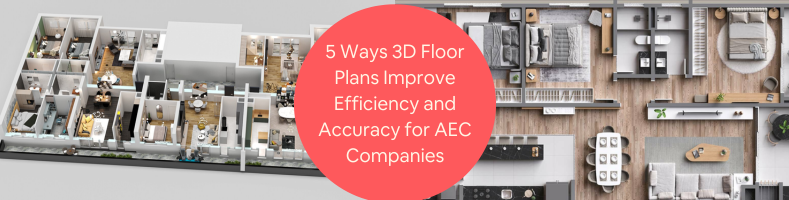
At this point of architectural software development, it’s safe to say that 3D CAD (computer-aided design) and BIM (Building Information Modeling) might have been the best things to have ever happened to the AEC industry. As a heavy bulk of the world quickly moves toward digitalization, architectural design services are among the first to welcome the transformation and adapt to all the changes that come with it.
3D CAD, at least when used within the scope of design and architecture, refers to the process of creating three-dimensional models of objects and structures using specialized software. Such a method practically replaces the need for manual drafting and, at the same time, improves workflow speed and accuracy. BIM is a step higher in terms of complexity because it integrates data generation into the 3D model.
BIM software can automatically generate complex construction data from an intelligent 3D model of structural components, allowing architects to build not only an accurate visualization but also crucial information such as cost estimation. An easy example of this process is observable in a 3D floor plan, created within a BIM environment.
Even though BIM software is, in almost all cases, much more feature-rich than its 3D CAD counterpart, adoption is quite slow. For instance, you can find 3D modelers and render artists from just about every general freelancing site on the web, but BIM management professionals, unfortunately, remain rather scarce. That is, unless you’re looking at the right place, such as Cad Crowd, which is an AEC-specialized talent marketplace.
🚀 Table of contents
How AEC companies can benefit from 3D floor plans
The term “floor plan” is pretty self-explanatory; it’s traditionally a scaled sketch of a specific area or an interior space of a building observed from an elevated position. In other words, a floor plan is a top-down diagram of a floor as if you’re looking at it through the roof and ceiling. It’s often heavily annotated to describe room dimensions, positions of doors and windows, and load-bearing structures. Some floor plans are color-coded for better clarity.
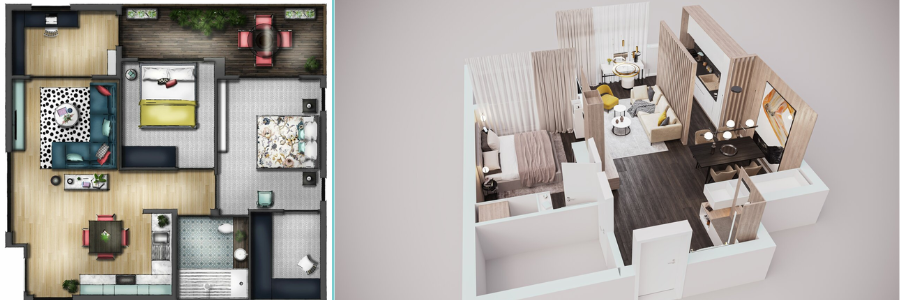
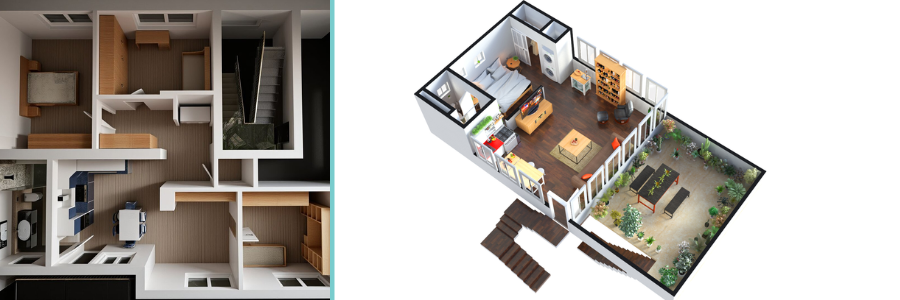
Like most three-dimensional architectural models, a 3D floor plan is drawn in a digital environment using 3D CAD or BIM software. It can be drawn from scratch or converted from a conventional 2D version, where walls are given height and interior objects (such as furniture and fixtures) are added. To achieve a higher realism effect, a 3D floor plan might use lighting and shadow renders as well. The result is like a simplified but still realistic interior rendering that clearly displays object placement and how the rooms connect with each other. If you want, the floor plan can include a small portion of exterior rendering, too.
Based on the level of realism, there are several different types of 3D floor plan services.
- Top-down view: a basic 3D floor plan that showcases an aerial bird’s-eye view of an interior layout.
- Isometric: a floor plan of this style doesn’t usually have a top-down perspective, but an elevated, angular view. There’s no perspective distortion, so it’s easier to understand the depth and spatial relationship of the interior space. Some isometric 3D floor plans have accurate wall colors, too.
- Annotated: either a basic or an isometric 3D floor plan, but with labels to help identify the rooms.
- Interactive: an isometric 3D floor plan, but with clickable points to showcase realistic renderings of the spots. The downside is that you can only make use of the interactive feature when opening the floor plan on a computer. Also, it might be overkill because you also need to have the renderings made ahead of time.
- Realistic render: an isometric floor plan, which also uses realistic light and shadow renders.
An isometric 3D floor plan is by far the most popular of the bunch for good reason. An elevated angular view perspective easily provides a clear understanding of the spatial relationship between all the rooms and spaces, yet it remains simple enough to maintain affordability.
Immersive visualization
It goes without saying that the fundamental advantage of a 3D floor plan over its two-dimensional counterpart comes from its ability to deliver a lifelike visualization of the interior layout. A 3D floor plan doesn’t use complex lines and symbols to represent a space, but realistic models of objects and structural components used in an interior design service. A three-dimensional image also feels natural to human eyes, allowing us to easily perceive depth and spatial relationships of the floor plan.
Traditional 2D floor plan is still widely used in construction projects of all sorts; in fact, it remains the standard (obligatory) format in the AEC industry. However, it uses a lot of symbolic representations in an orthographic projection; unless you have trained eyes and a good level of mental interpretation, you may find it difficult to translate the image into a tangible visualization of the final structure. Differences in understanding between professionals and clients can lead to miscommunication, cost discrepancies, or clashes in design decisions that may significantly affect the project timeline.
On the other hand, a 3D floor plan offers an unambiguous representation of the interior layout using recognizable models to visualize real-world objects. For example, the models for pieces of furniture appear like miniaturized versions of the actual products; the same thing applies to the doors, windows, stairs, fireplace, and every single object in the interior space. Some are even drawn in full color. Three-dimensional visualization helps clients to understand the layout, scale, and connection between the rooms almost in an instant, even if they’ve never seen any floor plan before.
A visceral understanding of the layout enables all stakeholders to identify design flaws, such as ineffective object placement, potential usability issues, and cumbersome spatial arrangements. These issues might have gone unnoticed in a two-dimensional floor plan and only become apparent when the construction is in progress, prompting a redesign and potentially expensive rework.
If the 3D floor plans are created within a BIM framework, it becomes much more than just visualization, but an automated “clash detection” tool as well. One of the biggest advantages of BIM is its ability to integrate detailed object data from various disciplines, including architectural, structural design services, and MEP (mechanical, electrical, and plumbing), into a single comprehensive model. BIM software can automatically flag and detect interferences or incompatibilities among the objects based on the given specifications.
There are a few types of interferences or “clashes” that may occur in any construction project:
- Hard clash: an obvious kind of interference in which one physical space is occupied by two objects, such as a plumbing pipe running through where the fireplace is positioned. Hard clashes are rare, even in complex projects.
- Clearance clash: objects do not physically interfere with each other, but their placements are incorrect for some reasons, such as insufficient clearance for installation, issues with building code compliance, potential maintenance difficulty, etc.
- Workflow clash: conflicts in project scheduling, where the installation or construction of certain components is impossible because it’s scheduled ahead of the prerequisite. For example, the installation of a bathtub is scheduled before the plumbing work.
“Clashes” are among the biggest contributors to budget overruns. A 3D floor plan facilitates a proactive measure to identify inconsistencies and redundancies in a construction project, minimizing the possibility of mistakes and expensive rework. On the contrary, detecting clashes in a 2D environment may involve a lengthy process of overlaying dozens of images and manually inspecting the errors.
Proactive clash detection within the BIM environment ensures the design team has every opportunity to identify inefficiencies and resolve issues long before they generate the BOM (Bill of Materials) and begin construction.
RELATED: Why you need lease outline drawings: A guide for architectural design services
Data-rich models
BIM software doesn’t generate a mere geometric representation of a floor plan, but an intelligent 3D model tied to a wealth of information. Every object in the entire model, from structural beams and flooring materials to lighting fixtures and carpets, can be infused with detailed information, including material properties, fabrication methods, installation requirements, manufacturer specifications, and more that are essential for architectural design professionals. When accessed on a computer, a single click on any particular element will bring up all the associated data.
A 3D floor plan made using BIM software is a prime example of how non-graphical data and visual representation of a structure are merged into an integrated plan that works as a comprehensive reference for the whole project. Because information about the project is no longer scattered across multiple drawings, the risk of inconsistencies is slim to none.
And thanks to the nature of 3D BIM, any change made to an object (whether the visualization detail or the data) triggers an update to the entire model and project documentation. This is to ensure that all stakeholders always have access to the latest and most accurate information every time, further reducing the chances of mistakes due to conflicting data.
If you have a realistic 3D model imbued with detailed data, the process of calculating the quantities and cost of materials, known as quantity takeoff, becomes a lot easier as well. Since every object contains information about its specification, BIM software can extract data from the model to calculate material quantities and estimate costs. For example, it can calculate the amount of material required to build a concrete floor based on the specified square footage and thickness, the number of light switches per room, and the cost of the furniture, etc.
Automated quantity takeoff allows for accurate cost estimation from the early stages of the project and better-informed financial planning. Moreover, AEC companies operate much more efficiently because material overordering generates more waste. Budget control gets easier, too. Every single modification applied to the 3D floor plan affects the cost estimate in real-time. This approach encourages the stakeholder to implement tighter budget control throughout the entire design and construction phases and avoid overspending.
This is not to say that quantity takeoff is entirely inaccurate with 2D drawing services; it’s just that the process is laborious and susceptible to mistakes, where even a small miscalculation can result in budget discrepancies.
Enhanced communication
Accuracy is of the utmost importance to improve efficiency, but it’s not the only thing that matters. Apart from ensuring precise visualization and quantity takeoff, 3D floor plans also function as an effective bridge to foster collaborative workflow among all stakeholders.
Because a 3D floor plan is essentially a data-rich model presented as an immersive visualization, it breaks down the typical silos of construction project management. Every single person involved in the project is aware of the latest development in detail via an easy-to-understand 3D model. It fosters better communication among team members and encourages feedback from the client. Both factors improve AEC companies’ ability to complete projects faster with fewer resources while maintaining a high standard of quality.
The workflow in AEC companies traditionally follows a linear pattern, where the architect hands off the design to the engineers, who then pass the more detailed construction plans (based on the design) to the contractors. Linear workflow isn’t always inefficient, and the vast majority of AEC companies still apply the method. Compared to the BIM workflow, however, the traditional process leaves a lot to be desired.
A cloud-based BIM platform allows everyone on the design team to access the 3D floor plan, propose or make modifications, and see the latest changes in real-time. In theory, all the stakeholders are granted access to the model, but the project manager (who can be the architect, general contractor, or even the client) has the option to limit the access. For instance, stakeholders can see and propose changes to the 3D floor plan, but only members of the design team can approve any modification. Either way, this kind of parallel workflow leads to more cohesive teamwork. Design iterations happen more quickly, and the decision-making process is more transparent.
RELATED: Full guide: Commercial architectural 3D rendering services for companies & firms
Prefabrication and modular construction
Over the last decade or so, the architectural industry has been slowly moving toward a modular construction approach using prefabricated components to improve safety, speed, and efficiency. While not every component can be manufactured off-site and assembled on-site, prefabrication is becoming a popular choice today. A major key to successful prefabrication is the data accuracy and level of detail provided by 3D models.
Professionally drafted 3D floor plan delivers not only a lifelike visualization of the interior layout, but also precise information about every component to be used in the construction project. Both are essential to ensure that prefabricated components (if any) are manufactured to the correct specifications and will fit together seamlessly when assembled on-site. If the 3D floor plans are drawn as a BIM model instead of a rendered visualization, the specification information can be fed into a CAM (computer-aided manufacturing) system to automate the fabrication process. With the implementation of such a modern construction process in a 3D floor plan, AEC companies can maintain a high level of accuracy and efficiency for the manufacturing and assembly of prefabricated components.
Efficient building management
A 3D floor plan is almost like a traditional blueprint with the added benefit of digitalization. Think of the model as an “as-built” model, used for reference when conducting an inspection, for example, routine maintenance and repair. The data stored in the model serves as a repository of information, replacing the traditional binder of manuals and paper drawings. Building managers can simply open the interactive 3D floor plan to locate components, identify their specifications, and access the maintenance information. For instance, if a shutoff valve in the kitchen misbehaves and needs to be replaced, the manager can look for the exact specification (such as make, model, purchase date, maintenance history, etc.) in the digital file. Having instant access to detailed data on every component can greatly streamline building operations and maintenance. For a more complex project, such as remodeling or renovation, a 3D floor plan is an invaluable tool that AEC companies can use to plan the entire project.
Takeaway
Using 3D CAD and BIM to create 3D floor plans represents a major shift in how AEC companies operate. In addition to providing a clearer spatial understanding of an interior layout for clients, a 3D floor plan can unlock a range of advantages that improve companies’ ability to deliver quality projects and, ultimately, affect their bottom line. Lifelike visualization enables greater accuracy, while a data-rich model supports precise quantity takeoffs and automated clash detection. At the end of the day, a proper 3D floor plan generated using a BIM system can minimize errors and potentially costly rework. Clear imagery of the proposed interior layout also supports a more effective collaborative workflow, enhancing communication among stakeholders and leading to faster design iterations. All these benefits allow for more predictable outcomes within a shorter project timeline.
In an increasingly technology-driven market, the question for AEC companies is no longer whether they need to adopt 3D floor plans, but how to leverage 3D CAD and BIM software to optimize efficiency and accuracy for a greater competitive advantage. The big issue with BIM implementation in the AEC industry is the lack of professionals specializing in the software.
If you’re looking for true BIM specialists to create lifelike, data-rich, and accurate 3D floor plans for any project, your best bet at the moment is to hire professionals from AEC-focused platforms. Cad Crowd is among the most reputable of its kind, with more than 15 years of experience in the field and robust vetting processes to ensure you get the most qualified professionals for the job. Get a free quote today.



