Cad Crowd’s Service Offers let expert freelancers showcase ready-to-purchase services with fixed‑price packages or hourly tasks on their profiles. Clients can browse your skills, ask questions, and make purchases directly, making it easy to connect without the need for proposals.
🚀 In this article
How to post a Service Offer
Use the following steps to post a new Service Offer:
- Log in: log in to your account
- Services list: go to your services list
- Post a service: click the Post a service button
When adding a Service Offer, please review Cad Crowd’s Service Offer Requirements and Prohibited Service Offer categories to check that your service complies with the platform’s terms of service.
How many Service Offers can I post?
The number of Service Offers that you can share depends on your account status:
- New accounts: As a new user, you can post up to 20 Service Offers.
- Top Designers: Experts with a Top Designer badge up to 30 Service Offers.
If you reach your account limit, you’ll need to delete old Service Offers before adding a new one.
Planning your Service Offer
Remember to consider these criteria when you add a Service Offer:
- Experience: Does the service align with your expertise and what clients typically request?
- Service delivery: Is the Service Offer easy to deliver as a fixed-rate project or hourly service using the Cad Crowd Timer app?
- Portfolio: Can you leverage past projects you can showcase to demonstrate your capabilities?
- Add-ons: Does the service allow potential add‑ons (e.g., faster delivery, additional revisions, etc.)?
You can create multiple Service Offers, each tailored to meet the specific needs of clients, while ensuring clarity and scalability.
Steps to create a Service Offer
You can then add a new service by following the steps below:
1. Add a new Service Offer
- Add a service: Add a Service Offer by selecting the Post a service button
- Manage services: You can manage and edit your active Service Offers in your service list
2. Overview
- Service title: Share the deliverables (e.g., “3D product rendering in V-Ray“) for your Service Offer in just a few words.
- Description: Explain why clients should choose your Service Offer. You can highlight unique value, delivery speed, or progress-based payment milestones.
- Category: Choose the main categories for your service on the site.
- Skill/software tags: Select the most relevant skills and software that best match your service offerings. The tags help potential clients find your service.
- Questions & answers: Add Q&A to help answer commonly asked client questions. A Q&A that includes frequently asked questions reduces the amount of back-and-forth with new clients and increases sales.
3. Pricing & scope of your service
- Pricing tiers: Select up to three price tiers (Simple, Standard, Advanced) for your service, each with its corresponding deliverables and pricing.
- Add-ons: Add optional add-ons for your service to provide clients with flexibility and increase your revenue (e.g., extra revisions, file types, rush delivery).
- Price per hour (hourly): You can add your hourly rate for a specific type of service (e.g., 3D architectural rendering) on a cost-per-hour basis.
4. Gallery for services
- Add images: Upload high‑quality examples, images, 3D models for the viewer (supported formats), videos, or PDF samples that showcase what the client will receive with your Service Offer.
- Guidelines: Avoid including watermarks, clickbait, or disclosing personal contact information.
- Create a portfolio: Consider adding 3D models to your user profile (learn more). Your Service Offer will display up to 3 models shared from your user profile.
5. Finalize & submit
- Media rights: Agree that you own the rights to share your gallery & media.
- Terms of Service: Please remember to follow Cad Crowd’s platform guidelines and terms of service.
- Submit for review: The Cad Crowd Team manually reviews each Service Offer and may request changes before approving your service.
Edit your Service Offer
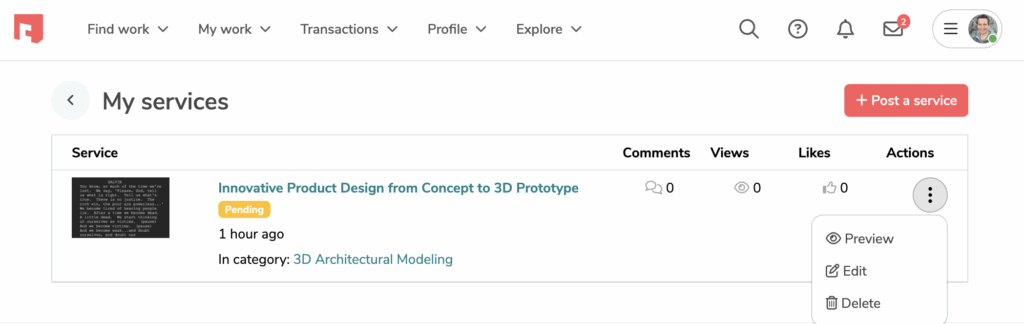
Steps to edit your Service Offers:
- Log in > visit Services list
- Select the (•••) dropdown next to the Service Offer you want to edit
- Click the Preview, Edit, or Delete in the dropdown
🚀 Tips for top‑performing Service Offers
- Title: Keep titles concise, descriptive, and keyword‑rich.
- Gallery images: Use strong, polished visuals – with minimal text.
- Spelling & grammar: Proofread your submission carefully, since typos can delay or block approval.
- Similar services: Browse the other Service Offers on Cad Crowd and identify the gaps you can fill or niches to specialize in.
Optimize your profile to boost visibility
Make sure your user profile is polished and professional before creating a Service Offer. You can maximize your success with the following:
- Profile photo: Does your profile photo inspire confidence?
- Profile title: Is your profile title clear and use keywords that cover your main skills?
- About: Is your biography engaging and concise?
- Portfolio: Have you added a portfolio and 3D models that showcase your skills for various types of work?
- Recommendations: Have you asked your past clients for recommendations to show strong feedback on your profile?
A complete profile boosts trust and ensures your Service Offers convert into sales.
🛰️ Tip: Read more about creating a great profile on Cad Crowd.
