
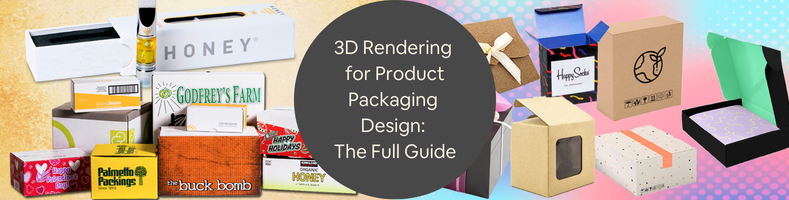
Packaging is the first and easiest way to differentiate your product from all others displayed on store shelves. Want an easy example? Bottled water. There’s no way you can tell if the water contained in any particular bottle is any different from the next, unless you read the labels and do a taste comparison. Even by then, you probably won’t notice if one is just tap water put into a clear bottle or vapor distilled and kept in a slightly fancier container. Some people swear they can tell which is which without looking at the brands, but we’re never sure who these people are. Worse still is the pH level. It turns out that pH (apparently is short for Potential Hydrogen, who knew?) indicates the acidity. The lower the number, the higher the acidity. But have you seriously given it a thought before picking up a bottle from a convenience store? Unlikely. Chances are, you choose one with a greater number and feel proud of yourself as you walk to the cashier.
That, in a nutshell, is how important packaging design services are. The same thing applies to shampoo, soap, liquid detergent, foods and beverages, cosmetics, wristwatches, smartphones, pencils, and just about every other consumer product in the market. People choose a product because the packaging makes them feel confident about their purchase. Although other considerations, such as cost, brand loyalty, and whether their favorite movie star endorses it, also influence the buying decision, packaging plays a significant role. Some products sell better just because companies slap a photo of a K-pop idol on the box.
On a more serious note, packaging is almost just as important as the product it contains. Businesses have recognized this importance for a long time and invest substantial resources in the design and development of packaging as part of their marketing strategy. Along the way, 3D CAD modeling and photorealistic rendering software were introduced to streamline the design process. As technologies advance and the market becomes more competitive, it turns out that effective packaging visualization is a complex undertaking.
As more people shop online, companies are in a race to develop the most impressive, convincing, and persuasive product packaging renderings to attract these customers. Which makes perfect sense, because when people see products on a smartphone or laptop screen, a photorealistic visualization becomes a powerful tool for turning lookers into actual buyers.
But creating an accurate, high-fidelity CGI for product packaging isn’t a skill anybody can learn and master overnight. It takes an experienced CAD professional or perhaps a team of digital artists to develop the design, transform it into a 3D model, and render it into photorealistic visuals. Cad Crowd, a freelancing platform specializing in product development, helps you connect with thousands of design professionals and render artists who offer a broad range of CGI services at affordable rates. All the talents on the platform have been pre-vetted to ensure you’ll only collaborate with the most talented and qualified freelancers from around the world.
What to know about packaging rendering
First things first, rendering is different from designing, but the two can be parts of the same process. Let’s put it this way: not every design process ends up with a rendering, but every rendering workflow definitely involves design and 3D modeling services. Perhaps an example can clear things up a bit better:
- Say you plan to sell a homemade car air freshener product in a blister card packaging during the upcoming county fair. You ask a graphic designer friend to create an illustration for the otherwise blank card. Because, for some reason, you give this friend complete freedom of approach, you end up with a bold image of some sort of Batmobile on the card. The designer sends you the printable file, and the job is done. No rendering required.
- Your next-door neighbor has the same idea, only better. Instead of limiting sales to fairgoers, the plan involves listing the product on an online marketplace. To make the product look better on screen, this neighbor of yours has the packaging rendered and optimized for digital screens by the same graphic designer. The project is covered by an NDA, so even if the designer is your friend, you know nothing about it. The workflow involves not only designing the blister pack but also converting the design into a 3D model and rendering it. In this case, the final deliverables include a fully rendered image file and the 3D model for future use.
To compete in the online marketplace, you decide to use photographs (instead of rendering) to display the air freshener product. It’s from this instance that you realize that a rendering can look so much better and more creative than photos when used for a product display on the web. Oh, and the Batmobile appears a lot more realistic than yours.
RELATED: Top 101 sites for freelance engineering jobs, mechanical design projects, & remote work
How a rendering happens
The design part always comes first. It may involve brainstorming or ideation, drawing sketches, or consulting references from existing product packaging. What comes next is the real deal: powering up the computer and tinkering with the design in a 3D CAD software. Modeling accounts for the bulk of the task, as the result can determine whether you end up with a poorly executed rendering or a high-quality one. The more detailed and accurate the models are, the better the rendering will be for the product design firm.
Unprocessed 3D models are plain, sometimes colorless, and have less obvious boundaries between one another. Every object needs textures, material properties, color, and surface patterns to define its characteristics. The models must also be positioned in specific arrangements in the scene, just as a professional photographer determines the right composition. When the grayscale scene is ready, the lighting setup and shadows are configured in a rendering software to give the scene a photorealistic look.
At this point, the 3D models (and, by extension, the entire scene) are converted into an image file. Some post-processing, such as color adjustment or other final touch-ups, might be necessary to improve the realism. If the resulting image needs corrections, the render artist must return to the 3D models to make the changes and repeat the process. Everything about it sounds very complicated indeed, but the rendering process gives you an advantage that no photograph can: the 3D models can be reused as many times as you need and redone with different visual properties. You can give them different colors and labels, place them in a new scene, apply animations, etc. All can be done on a computer screen; no photographs or props are needed, so it saves time and money.
So many rendering types to choose from
Well, there are only a few types mentioned here, which should be more than enough to offer the variety you need for every product packaging.
- Conceptual
At the same time, the most useful and useless packaging rendering of all. Also, its usefulness comes only from the fact that it’s likely low-fidelity and therefore quick to generate. Packaging concept design services cannot care less about high resolution, texture detail, lighting accuracy, and everything else that makes a packaging visualization good. The most important thing is that you can produce many of them in a time-efficient manner, so you can check if any particular design works well to your liking. Low-fidelity rendering lets you experiment with shapes, colors, composition, typography, artwork placement, and other elements without spending too much time processing the work. It’s also useless, since you should never put conceptual renderings on the product page. Think of it as glorified rough sketches. It looks good as a concept, but terrible for actual use.
RELATED: What are proven product design principles when working with companies & freelancers?
- Photorealistic
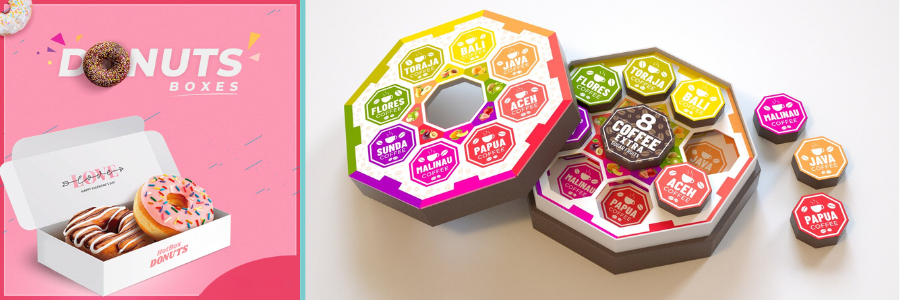
If a conceptual rendering is merely experimental and meant to test ideas, a photorealistic rendering is where things get serious. It’s the continuation of a concept, or a refined version of the best concept you chose earlier. But just because the concept is good and you have an image rendered, it doesn’t always mean the result will be photorealistic. Product packaging rendering, or any kind of photorealistic visualization, is a job best left to a professional. For a rendering to achieve photorealism, almost every visual aspect has to be correct. Visual aspects aren’t limited to geometry, dimension, and color, but also include material textures and lighting. The CGI is so precise that it does represent what the human eye can see. Everything has to be as realistic as a photograph, just like what the term says. Photorealistic rendering can be static or animated, with animated rendering among the most complex to generate.
- Interactive
Although not to the point where you can interact with the rendering like in a video game, an interactive visualization lets you explore the packaging design a bit more closely. Take, for example, the rendering of the car air freshener. When presented in an interactive format, there is usually a slider to zoom in, rotate, flip, or move the image around on the screen. A static rendering might show the Batmobile on the card, with a small label in Comic Sans that reads “It Smells Good” underneath. By the way, it remains unclear if the label refers to the Batmobile or the air freshener itself. But when presented in an interactive format, you can flip the whole image and find another label on the back that admits the product is not made in Gotham. You can, of course, make two static renderings to showcase both the front and back sides of the packaging, but the interactive type is just a lot more fun and satisfying.
- Silo
Also known as white background rendering, the packaging in a silo visualization is presented as a stand-alone object. There’s nothing else to distract your attention from it, allowing you to see every detail in all its glory. At the same time, this prevents the CGI render expert from making any excuses for putting out poorly made CGI. This is not to say that mistakes are tolerable when the scene has multiple objects; it’s just that you may have a harder time noticing that some portions of the shadows are either too bright or overly dark, unless, of course, you’re an eagle-eyed observer yourself.
- Lifestyle rendering
The vast majority of lifestyle rendering is meant for product visualization, not the packaging. That said, lifestyle rendering makes sense if you want to display the product still inside the container, like most things are. Which brings us back to the previously used example of bottled water. There’s just no workaround. You’re selling water, and the only way to showcase everything that’s good about the product is when it’s still in the bottle. And believe it or not, bottled water isn’t the only product that fits this category. A lot of collectible toys and action figures are sold on online marketplaces with the box still unsealed, and so are perfumes, liquid supplements, etc. In lifestyle rendering, the product is displayed with complementary objects in the scene. For example, bottled water might be displayed alongside a lunchbox, fruits, and in some cases, a mountain in the background, although everyone knows the water is processed in a factory.
Every type of rendering can be formatted as static or animated. As the name suggests, static rendering is still imagery, like a photograph. You can’t interact with the image either, except for probably zooming in and out. An animated rendering, on the other hand, is formatted like a video and can use every visual effect imaginable, from a plain and simple rotation played in a loop to an outrageous Michael Bay-style. Advanced 3D modeling and rendering software enables companies to present their products and packaging in the most creative and imaginative ways while maintaining good accuracy. They can simulate physical details, add movements, create unique characters, and be playful with packaging design. The only limit is the imagination. Maybe the bottled water can burst out of the cap all of a sudden, or the Batmobile produces the rumbling sound of a muscle car in an animated rendering.
RELATED: The importance of iteration in product development & working with product design companies
A prototype in the virtual world
With so many people purchasing products online, rendering has become an increasingly popular alternative to product photography. Rendering doesn’t need physical objects, and is much more flexible in case you want to use animation or some level of interactivity.
But the biggest advantage of 3D rendering isn’t actually about the finished visualization itself, but the design process as a digital prototype. Back in the old days, the term “prototype” was almost exclusively used to describe a physical product yet to be manufactured by a manufacturing design firm, let alone launched. Now, thanks to 3D CAD technology, a prototype can be entirely virtual with no physical form.
Everybody and everything has a digital twin these days. In fact, some people seem to enjoy their lives in the virtual world more than in the real one. It turns out people and their avatars aren’t the only fans of the Matrix. Product packaging designs, too, are very pleased with the Tron environment, for good reasons.
Conventional prototyping is time-consuming because it requires physical samples for each design iteration. While samples for product packaging aren’t probably the most expensive things in the world, the time spent on creating each and every version can still overwhelm the design process. A packaging sample can be made from readily available materials, such as cardboard or plywood. A handy person might be able to fashion the shape of a bottle from those materials, too. It’s not going to look pretty, but then again, it doesn’t have to be. A physical prototype is meant to facilitate design reviews through an iterative process. But as you improve the design with each revision, you’ll need to make a production-ready prototype, and this is where things can get expensive.
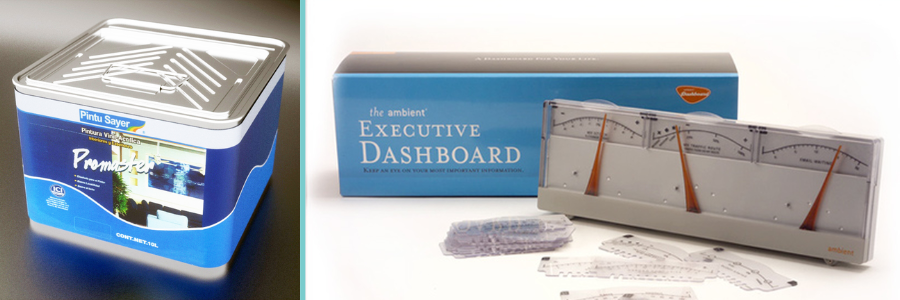
Say you’re making decorative tin packaging for tea or tobacco products. Instead of the usual printed graphics, you choose laser-etched textures to give it a premium look and feel. It’s not likely that you’re going to produce an accurate sample using papers or bamboo. A production-ready prototype should be nearly identical to the final version (in terms of materials, dimensions, textures, features, and functionality). You need to review and test the packaging design before consumers even get to see it on store shelves. Only when you’re sure the packaging looks and functions exactly as intended can you afford to send it to the manufacturing line.
With 3D modeling and rendering, it’s possible to design and build virtual prototypes without spending a dime on purchasing materials and hiring a CNC machinist for consumer product companies. All prototype versions, including the production-ready one, may exist as digital files on your laptop. Making design changes is no longer time-intensive, and the results are visible in an instant. You get to try countless graphic options for the tin, animate the model to see how the hinges work, fill it with water to test for leaks in simulation, and so forth. You can do all this on a screen to keep things efficient.
As a friendly reminder, only use high-quality 3D models. Nothing makes a packaging visualization look gloomier than low-poly models suffering from a terrible lack of detail. These low-poly models are cheap, sometimes even free, but certainly not cheerful. They should be reserved solely for conceptual rendering. On the other end of the spectrum, high-quality 3D models can be costly, should you decide to purchase them. However, there might be limitations on the models you can buy, especially if you’re making completely custom packaging. The only practical solution here is to create the models from scratch. It’s not the most time-efficient, but in most cases, building from scratch is the only way to get the job done.
3D rendering provides a realistic and, more importantly, view of the packaging design long before production begins. The accuracy isn’t limited to geometry and dimensions, but also to textures and material finishes. If there are illustrations, brandings, logos, instructions, or labels of any kind, the render engine can process those as well. You can scrutinize the design as far as you want, down to the tiniest detail, at zero cost, except for the render artist’s hourly rate, for sure. Each time you discover room for improvement, making revisions is far quicker and cheaper than doing so on a physical prototype.
If you have to work with stakeholders who are as invested in the project, you can store virtual prototypes (including all their versions and modifications) in a centralized database for easy, simultaneous access. Everybody can see the latest prototype and its revision history for more streamlined, informed design decision-making.
RELATED: How innovative design techniques can supercharge your new product concept
Layers of packaging
Selling one unit of bottled water to a cyclist certainly needs a different approach than supplying dozens of boxes of the product for a cycling race. A cyclist probably notices that your bottled water has the exact pH level recommended by a random person on the Internet, and boys, it, but the logistics manager of a cycling race takes a deeper look and wonders if you have a nice, colorful, thick packaging box to ensure safety during transportation. Depending on the product and your buyers, you may need to provide multiple layers of packaging, especially for product engineering services.
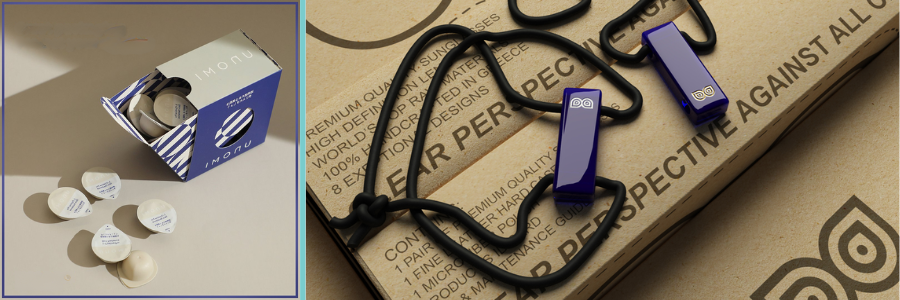
Primary: the first layer of packaging of a product. For bottled water, the primary packaging is the bottle itself. Therefore, your primary concern is every individual buyer in every convenience store. Just a suggestion, perhaps it’s best not to include the blue color as it seems to have been overused to exhaustion by other companies. People want a refreshing design as much as they crave hydration. The use of recyclable material is always optional.
Secondary: This is the box we discussed earlier. It’s supposed to provide an extra layer of protection on top of the primary layer. Sometimes you can use the extra space on the box to display additional product information. The design of a secondary layer should primarily target bulk buyers. Secondary packaging often needs to be stackable and keep the individual products organized.
Tertiary: specifically designed for manufacturers (when the products are still fresh out of the production line) and warehouses. The main function is to protect the product during shipping and ensure easy handling. Appearance isn’t that important for this layer. So long as it’s rigid enough to withstand bumps and impacts, it’s good to go.
When you do need multiple layers of packaging for a product, it goes without saying that you must design them well (and preferably with a 3D modeling design expert), not only to impress passersby who glance at your billboard ad, but also to enhance the product’s safety and shelf life.
Takeaway
Packaging is, first and foremost, a container to protect the product inside. Now that we’ve discovered easy, affordable, and industrial ways to make protective packaging from a broad range of materials, the focus has expanded into the aesthetic territory as well. Thanks to modern manufacturing technology, companies can maintain and enhance the functionality of product packaging while deepening its visual appeal. For quite a while now, 3D rendering has been at the forefront of the new movement. Specialized visualization software enables companies to design effective product packaging almost entirely on a computer screen through virtual prototyping. They get to simulate physical details, experiment with materials, try an unlimited variety of designs, and analyze everything without the need for physical samples. Request a quote today.



